CrispyWaffle.RabbitMQ
CrispyWaffle.RabbitMQ sends and receives messages through a RabbitMQ broker and provides a log provider that publishes CrispyWaffle log messages to a RabbitMQ exchange.
Use it when you want to publish typed messages to a queue or an exchange with a few lines of code, consume them through an event, or ship your application logs to RabbitMQ.
| Package | CrispyWaffle.RabbitMQ |
| Namespace | CrispyWaffle.RabbitMQ.Utils.Communications, CrispyWaffle.RabbitMQ.Helpers, CrispyWaffle.RabbitMQ.Log |
| Install | dotnet add package CrispyWaffle.RabbitMQ |
| Depends on | CrispyWaffle, CrispyWaffle.Configuration, RabbitMQ.Client |
How it works
RabbitMQConnector turns an IConnection (host, port, credentials) into a RabbitMQ.Client IConnectionFactory and stores a default exchange name. Every other type in the package takes a connector.
Message types are plain classes that:
- implement the marker interface
IQueuing, - have a public parameterless constructor (the methods use the
class, IQueuing, new()constraint), - carry a
[Serializer]attribute, because the body is produced withGetSerializer(). With[Serializer(SerializerFormat.Json)]the body is JSON; with the attribute's default format the body is XML. Without the attribute, sending throwsInvalidOperationException.
The target name comes from the message type:
[QueueName("...")]sets the queue name and[ExchangeName("...")]sets the exchange name.- Without the attribute, the name is the class name in lowercase (for example
OrderCreatedbecomesordercreated).
Sending
RabbitMQWrapper opens a new connection and channel for every call and disposes them when the call ends. Messages are published as persistent and UTF-8 encoded.
SendToQueueAsyncpublishes to the default exchange with the queue name as routing key. By default it first declares the queue as durable, non-exclusive and not auto-deleted.SendToExchangeAsyncpublishes to the named exchange with an empty routing key. It declares the exchange (durable, not auto-deleted) only when you pass an exchange type such asExchangeType.Fanout.
After each send the wrapper writes a trace entry through LogConsumer with the target name and the serialized body.
Receiving
MessageReceiver starts a background task for each ReceiveFromQueue<T> or ReceiveFromExchange<T> call and returns immediately. The task keeps its connection and channel open until the CancellationToken is canceled.
ReceiveFromQueue<T>consumes from the queue named byT. It does not declare the queue, so the queue must already exist.ReceiveFromExchange<T>declares a server-named queue, binds it to the exchange named byTwith an empty routing key, and consumes from it. The exchange must already exist.
Each delivery is decoded as UTF-8 and raised through the MessageReceived event as a MessageReceivedArgs (queue name and body). The body is the raw string; deserialize it yourself. The event handler runs on the RabbitMQ consumer thread.
The receiver has no API to acknowledge messages. Pass autoAck: true unless you only want to peek: with autoAck: false messages stay unacknowledged and are redelivered when the channel closes. Deliveries that arrive while no handler is subscribed to MessageReceived are ignored. Exceptions in the background task (for example a failed connection) are not surfaced to the caller.
Log provider
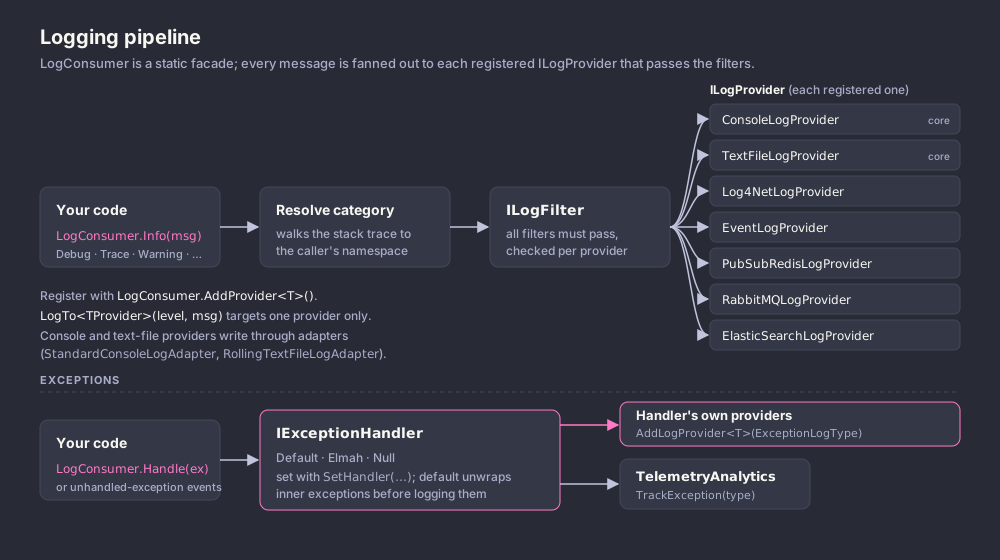
RabbitMQLogProvider implements ILogProvider. Its constructor connects synchronously, opens a channel and declares the connector's DefaultExchangeName as a durable fanout exchange. Log calls build a LogMessage (application, host, IP addresses, level, thread, and so on), serialize it as JSON and put it in an in-memory queue. A dedicated worker thread publishes the queued messages to the exchange with an empty routing key. Publish failures are written to LogConsumer.Trace and the message is dropped.
The worker thread is a foreground thread that only stops after the CancellationToken passed to the constructor is canceled, so cancel that token when your application shuts down or the process will not exit. The provider starts with no level enabled; call SetLevel before it writes anything.
Getting started
using System;
using System.Threading.Tasks;
using CrispyWaffle.Composition;
using CrispyWaffle.Configuration;
using CrispyWaffle.RabbitMQ.Helpers;
using CrispyWaffle.RabbitMQ.Utils.Communications;
using CrispyWaffle.Serialization;

[QueueName("orders")]
[Serializer(SerializerFormat.Json)]
public class OrderCreated : IQueuing
{
    public Guid Id { get; set; }

    public string Customer { get; set; }
}

public static class Program
{
    public static async Task Main()
    {
        var connection = new Connection
        {
            Host = "localhost",
            Port = 5672,
            Credentials = { Username = "guest", Password = "guest" },
        };

        ServiceLocator.Register(new RabbitMQConnector(connection));

        var wrapper = ServiceLocator.Resolve<RabbitMQWrapper>();

        await wrapper.SendToQueueAsync(new OrderCreated { Id = Guid.NewGuid(), Customer = "ACME" });
    }
}
Reference
RabbitMQWrapper
public class RabbitMQWrapper — publishes serialized messages to RabbitMQ queues and exchanges.
| Member | Description |
|---|---|
RabbitMQWrapper(RabbitMQConnector connector) |
Constructor. Throws ArgumentNullException when connector is null. |
SendToExchangeAsync<T>(T item, string exchangeDeclareType = null, CancellationToken cancellationToken = default) |
Serializes item and publishes it as a persistent message to the exchange named by T (see ExchangeNameAttribute), with an empty routing key. When exchangeDeclareType is not null or whitespace, declares the exchange first with that type, durable and not auto-deleted. Returns Task. T must be class, IQueuing, new(). |
SendToQueueAsync<T>(T item, bool queueDeclare = true, CancellationToken cancellationToken = default) |
Serializes item and publishes it as a persistent message to the queue named by T (see QueueNameAttribute) through the default exchange. When queueDeclare is true, declares the queue first as durable, non-exclusive and not auto-deleted. Returns Task. T must be class, IQueuing, new(). |
MessageReceiver
public class MessageReceiver — consumes messages from a queue or an exchange in the background and raises an event for each one.
| Member | Description |
|---|---|
MessageReceiver(RabbitMQConnector connector) |
Constructor. Throws ArgumentNullException when connector is null. |
MessageReceivedHandler |
Nested delegate: public delegate void MessageReceivedHandler(object sender, MessageReceivedArgs e). |
MessageReceived |
event MessageReceivedHandler. Raised for each delivery with the queue name and the UTF-8 decoded body. |
ReceiveFromQueue<T>(bool autoAck, CancellationToken cancellationToken) |
Starts a background consumer on the existing queue named by T. Returns immediately. The consumer stops when cancellationToken is canceled. |
ReceiveFromExchange<T>(bool autoAck, CancellationToken cancellationToken) |
Declares a server-named queue, binds it to the existing exchange named by T with an empty routing key, and starts a background consumer on it. Returns immediately. The consumer stops when cancellationToken is canceled. |
RabbitMQConnector
public sealed class RabbitMQConnector — holds the RabbitMQ connection factory and the default exchange name used by the other types.
The class has [ConnectionName("RabbitMQ")].
| Member | Description |
|---|---|
RabbitMQConnector(IConnection connection) |
Constructor. Uses virtual host / and default exchange {EnvironmentHelper.ApplicationName}.logs. |
RabbitMQConnector(IConnection connection, string virtualHost, string defaultExchange) |
Constructor. Copies Host and Port into a new ConnectionFactory, and the user name and password when they are not null or whitespace. Throws ArgumentNullException when connection or virtualHost is null. |
ConnectionFactory |
IConnectionFactory (RabbitMQ.Client) used to open connections. |
DefaultExchangeName |
Name of the exchange used by RabbitMQLogProvider. |
IConnection here is CrispyWaffle.Configuration.IConnection, not the RabbitMQ.Client interface of the same name. See CrispyWaffle.Configuration.
RabbitMQLogProvider
public class RabbitMQLogProvider : ILogProvider, IDisposable — log provider that publishes JSON-serialized LogMessage entries to the connector's default exchange.
| Member | Description |
|---|---|
RabbitMQLogProvider(RabbitMQConnector connector, CancellationToken cancellationToken) |
Constructor. Connects, opens a channel, declares connector.DefaultExchangeName as a durable fanout exchange, and starts the worker thread. Blocks until the connection is open. Throws ArgumentNullException when connector is null. |
SetLevel(LogLevel level) |
Sets the enabled levels. Calls for levels that are not enabled are ignored. |
Fatal(category, message) / Error(category, message) / Warning(category, message) / Info(category, message) |
Queues one message at that level. |
Trace(category, message) |
Queues one message at trace level. |
Trace(category, message, exception) |
Queues message, then the message and stack trace of exception and of each inner exception, as separate entries. |
Trace(category, exception) |
Queues the message and stack trace of exception and of each inner exception, as separate entries. |
Debug(category, message) |
Queues one message at debug level. |
Debug(category, content, identifier) |
Queues content at debug level with identifier stored in LogMessage.MessageIdentifier. |
Debug<T>(string category, T content, string identifier, SerializerFormat customFormat) |
Serializes content (with its [Serializer] format when customFormat is None, otherwise with customFormat) and queues it at debug level with identifier. T must be class, new(). |
Dispose() |
Closes and disposes the channel. It does not stop the worker thread or close the connection. |
IQueuing
public interface IQueuing — empty marker interface. Message types used with RabbitMQWrapper, MessageReceiver and the Extensions helpers must implement it.
Extensions
public static class Extensions (namespace CrispyWaffle.RabbitMQ.Helpers) — resolves queue and exchange names from a message type.
| Member | Description |
|---|---|
GetExchangeName<T>() |
Returns the value of the ExchangeNameAttribute on T, or T's class name in lowercase (spaces replaced by -). T must be class, IQueuing, new(). |
GetQueueName<T>() |
Returns the value of the QueueNameAttribute on T, or T's class name in lowercase (spaces replaced by -). T must be class, IQueuing, new(). |
These are static methods, not extension methods. Call them as Extensions.GetQueueName<OrderCreated>().
MessageReceivedArgs
public class MessageReceivedArgs — data passed to MessageReceiver.MessageReceived.
| Member | Description |
|---|---|
QueueName |
Name of the queue the message came from. For ReceiveFromExchange<T> this is the server-generated queue name. |
Body |
Message body decoded as UTF-8. |
QueueNameAttribute
public sealed class QueueNameAttribute : Attribute — sets the queue name for a message class. Applies to classes.
| Member | Description |
|---|---|
QueueNameAttribute(string queueName) |
Constructor. |
QueueName |
The queue name. |
ExchangeNameAttribute
public sealed class ExchangeNameAttribute : Attribute — sets the exchange name for a message class. Applies to classes.
| Member | Description |
|---|---|
ExchangeNameAttribute(string exchangeName) |
Constructor. |
ExchangeName |
The exchange name. |
Examples
Send a message to an exchange
Declare a fanout exchange on first use and publish to it.
using System;
using System.Threading.Tasks;
using CrispyWaffle.Composition;
using CrispyWaffle.RabbitMQ.Helpers;
using CrispyWaffle.RabbitMQ.Utils.Communications;
using CrispyWaffle.Serialization;
using RabbitMQ.Client;

[ExchangeName("rabbitmq-exchange-name")]
[Serializer(SerializerFormat.Json)]
public class SampleItemDto : IQueuing
{
    public Guid Id { get; set; }

    public string Text { get; set; }

    public DateTime Date { get; set; }
}

public static class Sender
{
    public static async Task SendAsync()
    {
        var wrapper = ServiceLocator.Resolve<RabbitMQWrapper>();

        var data = new SampleItemDto
        {
            Id = Guid.NewGuid(),
            Text = "some random text",
            Date = DateTime.Now,
        };

        await wrapper.SendToExchangeAsync(data, ExchangeType.Fanout);
    }
}
Send a message to a queue
The queue is declared as durable before the message is published.
using System;
using CrispyWaffle.Composition;
using CrispyWaffle.RabbitMQ.Helpers;
using CrispyWaffle.RabbitMQ.Utils.Communications;
using CrispyWaffle.Serialization;

var wrapper = ServiceLocator.Resolve<RabbitMQWrapper>();

await wrapper.SendToQueueAsync(new SampleQueueItemDto { Id = Guid.NewGuid(), Text = "hello" });

[QueueName("rabbitmq-queue-name")]
[Serializer(SerializerFormat.Json)]
public class SampleQueueItemDto : IQueuing
{
    public Guid Id { get; set; }

    public string Text { get; set; }
}
Consume messages from a queue
Subscribe to the event before starting the consumer, and cancel the token to stop it.
using System;
using System.Threading;
using CrispyWaffle.Composition;
using CrispyWaffle.RabbitMQ.Helpers;
using CrispyWaffle.RabbitMQ.Utils.Communications;

using var cts = new CancellationTokenSource();

var receiver = new MessageReceiver(ServiceLocator.Resolve<RabbitMQConnector>());

receiver.MessageReceived += (sender, e) =>
    Console.WriteLine($"{e.QueueName}: {e.Body}");

receiver.ReceiveFromQueue<SampleQueueItemDto>(autoAck: true, cts.Token);

Console.ReadKey();
cts.Cancel();
Ship logs to RabbitMQ
Register the provider with LogConsumer, enable levels, and cancel the token on shutdown.
using System.Threading;
using CrispyWaffle.Configuration;
using CrispyWaffle.Log;
using CrispyWaffle.RabbitMQ.Log;
using CrispyWaffle.RabbitMQ.Utils.Communications;

var cts = new CancellationTokenSource();

var connector = new RabbitMQConnector(
    new Connection { Host = "localhost", Port = 5672 },
    "/",
    "my-app.logs"
);

var provider = new RabbitMQLogProvider(connector, cts.Token);
LogConsumer.AddProvider(provider).SetLevel(LogLevel.Production);

LogConsumer.Info("Application started");

// On shutdown:
cts.Cancel();
provider.Dispose();