Events
Events let one part of an application announce that something happened without knowing who reacts to it. An event is a plain class that implements IEvent. Any number of handler classes implement IEventHandler<TEvent> (synchronous) or IEventHandlerAsync<TEvent> (asynchronous), and EventsConsumer delivers the event to all of them.
Use events for one-to-many notifications with no return value. When you need exactly one handler and a result, use commands.
| Package | CrispyWaffle |
| Namespace | CrispyWaffle.Events |
How it works
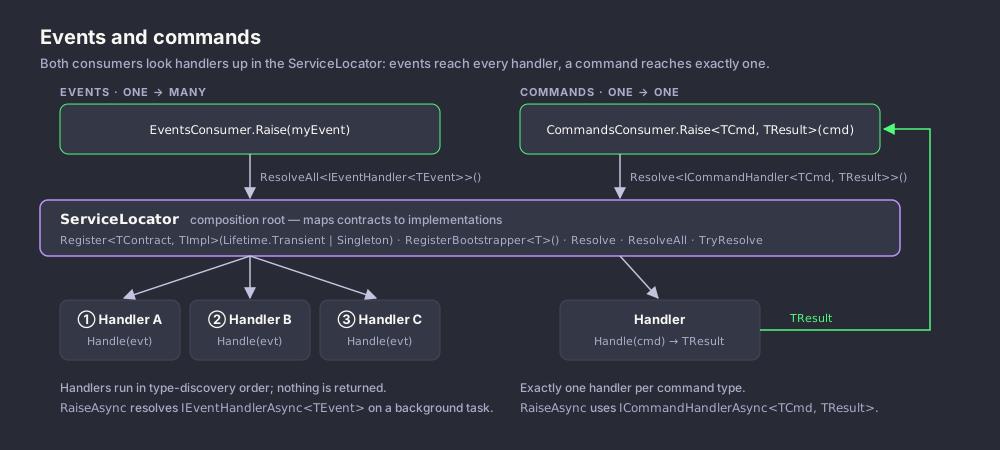
EventsConsumer.Raise(event) calls ServiceLocator.ResolveAll<IEventHandler<TEvent>>(). ResolveAll does not look at registrations to find handlers: it scans every type loaded when the service locator was initialized and creates one instance of each non-abstract class that implements the handler interface. You do not need to register handlers. Handler constructors can take dependencies, which are resolved by the service locator; a handler class that is registered under its own type (for example Register<MyHandler>(Lifetime.Singleton)) is created through that registration.
Handlers are called one after another on the calling thread, in the order their types appear in the loaded assemblies. That order is not the registration order and should not be relied on. Before each call, a trace message is written through LogConsumer.Trace. If a handler throws, the exception propagates to the caller of Raise and the remaining handlers are not called.
EventsConsumer.RaiseAsync(event) resolves IEventHandlerAsync<TEvent> handlers the same way, inside Task.Run, and calls HandleAsync on each of them in turn. The returned tasks are not awaited. As a result:
- The task returned by
RaiseAsynccompletes once every handler has been started, usually before the handlers have finished their asynchronous work. - An exception thrown before a handler's first
awaitfaults theRaiseAsynctask and stops the remaining handlers. An exception thrown after the firstawaitis not observed by the caller.
If a handler must finish before you continue, raise the event synchronously, or have the handler signal completion itself.
The two handler interfaces are independent: Raise only calls IEventHandler<TEvent> implementations and RaiseAsync only calls IEventHandlerAsync<TEvent> implementations. A class can implement both.
Getting started
using System;
using CrispyWaffle.Events;

public sealed class OrderPlacedEvent : IEvent
{
    public OrderPlacedEvent(Guid orderId) => OrderId = orderId;

    public Guid OrderId { get; }
}

public sealed class SendConfirmationEmail : IEventHandler<OrderPlacedEvent>
{
    public void Handle(OrderPlacedEvent args) =>
        Console.WriteLine($"Sending confirmation for order {args.OrderId}");
}

public static class Program
{
    public static void Main()
    {
        // No registration needed: every IEventHandler<OrderPlacedEvent> is found automatically.
        EventsConsumer.Raise(new OrderPlacedEvent(Guid.NewGuid()));
    }
}
Reference
EventsConsumer
public static class EventsConsumer — raises events and invokes their handlers.
| Member | Description |
|---|---|
Raise<TEvent>(TEvent @event) |
Constraint: TEvent : IEvent. Calls Handle on every IEventHandler<TEvent> implementation, synchronously and sequentially. Exceptions from a handler propagate and stop the remaining handlers. Does nothing if there are no handlers. |
RaiseAsync<TEvent>(TEvent @event) |
Constraint: TEvent : IEvent. Returns Task. Calls HandleAsync on every IEventHandlerAsync<TEvent> implementation on a thread-pool thread without awaiting the handler tasks. See "How it works" for completion and error behavior. |
IEvent
public interface IEvent — marker interface for event classes.
It has no members. Put the data the handlers need in properties of the event class.
IEventHandler<TEvent>
public interface IEventHandler<in TEvent> where TEvent : IEvent — handles an event synchronously.
| Member | Description |
|---|---|
void Handle(TEvent args) |
Called by EventsConsumer.Raise with the raised event. |
IEventHandlerAsync<TEvent>
public interface IEventHandlerAsync<in TEvent> where TEvent : IEvent — handles an event asynchronously.
| Member | Description |
|---|---|
Task HandleAsync(TEvent args) |
Called by EventsConsumer.RaiseAsync with the raised event. The returned task is not awaited by the consumer. |
Examples
Several handlers for the same event
Each handler class is discovered and called. Handlers can take constructor dependencies.
using System;
using CrispyWaffle.Events;
using CrispyWaffle.Log;

// Both handlers run.
EventsConsumer.Raise(new SomeEvent("Some text passed to all event handlers"));

public sealed class SomeEvent : IEvent
{
    public SomeEvent(string data)
    {
        Id = Guid.NewGuid();
        Date = DateTime.Now;
        Data = data;
    }

    public Guid Id { get; }

    public string Data { get; }

    public DateTime Date { get; }
}

public sealed class SomeEventHandler : IEventHandler<SomeEvent>
{
    public void Handle(SomeEvent args) =>
        LogConsumer.Warning(
            "Event 'SomeEvent' handled by 'SomeEventHandler'. Event Id: {0}",
            args.Id
        );
}

public sealed class AnotherSomeEventHandler : IEventHandler<SomeEvent>
{
    public void Handle(SomeEvent args) =>
        LogConsumer.Warning(
            "Event 'SomeEvent' handled by 'AnotherSomeEventHandler'. Event Id: {0}",
            args.Id
        );
}
One class handling an event both ways
This pattern comes from the test suite. Raise calls Handle; RaiseAsync calls HandleAsync.
using System;
using System.Threading.Tasks;
using CrispyWaffle.Events;
using CrispyWaffle.Log;

var @event = new TestDoneEvent(Guid.NewGuid(), "Sample test");
EventsConsumer.Raise(@event);
await EventsConsumer.RaiseAsync(@event); // Returns once LogDoneEvent.HandleAsync has started.

public sealed class TestDoneEvent : IEvent
{
    public TestDoneEvent(Guid identifier, string text)
    {
        Identifier = identifier;
        Text = text;
        CreatedDateTime = DateTime.Now;
    }

    public Guid Identifier { get; }

    public string Text { get; }

    public DateTime CreatedDateTime { get; }
}

public sealed class LogDoneEvent : IEventHandler<TestDoneEvent>, IEventHandlerAsync<TestDoneEvent>
{
    public void Handle(TestDoneEvent args) =>
        LogConsumer.Info(
            "Sample done action handled: {0} - {1} - {2:dd/MM/yyyy HH:mm:ss}",
            args.Identifier,
            args.Text,
            args.CreatedDateTime
        );

    public async Task HandleAsync(TestDoneEvent args) =>
        await Task.Run(() =>
            LogConsumer.Info(
                "Sample done action handled: {0} - {1} - {2:dd/MM/yyyy HH:mm:ss}",
                args.Identifier,
                args.Text,
                args.CreatedDateTime
            )
        );
}
Handling exceptions from a handler
An exception thrown by a synchronous handler reaches the caller of Raise.
using System;
using CrispyWaffle.Events;

try
{
    EventsConsumer.Raise(new ExceptionEvent(Guid.NewGuid()));
}
catch (NotImplementedException e)
{
    Console.WriteLine($"Handler failed: {e.Message}");
}

public sealed class ExceptionEvent : IEvent
{
    public ExceptionEvent(Guid identifier) => Identifier = identifier;

    public Guid Identifier { get; }
}

public sealed class ThrowExceptionEvent : IEventHandler<ExceptionEvent>
{
    public void Handle(ExceptionEvent args) =>
        throw new NotImplementedException(args.Identifier.ToString());
}