CrispyWaffle.Elmah
CrispyWaffle.Elmah provides an exception handler that sends exceptions handled by CrispyWaffle to ELMAH, through the ElmahCore library for ASP.NET Core. Use it when your web application already uses ElmahCore and you want exceptions passed to LogConsumer.Handle to show up in the ELMAH error log.
| Package | CrispyWaffle.Elmah |
| Namespace | CrispyWaffle.Elmah |
| Install | dotnet add package CrispyWaffle.Elmah |
| Depends on | CrispyWaffle, ElmahCore |
How it works
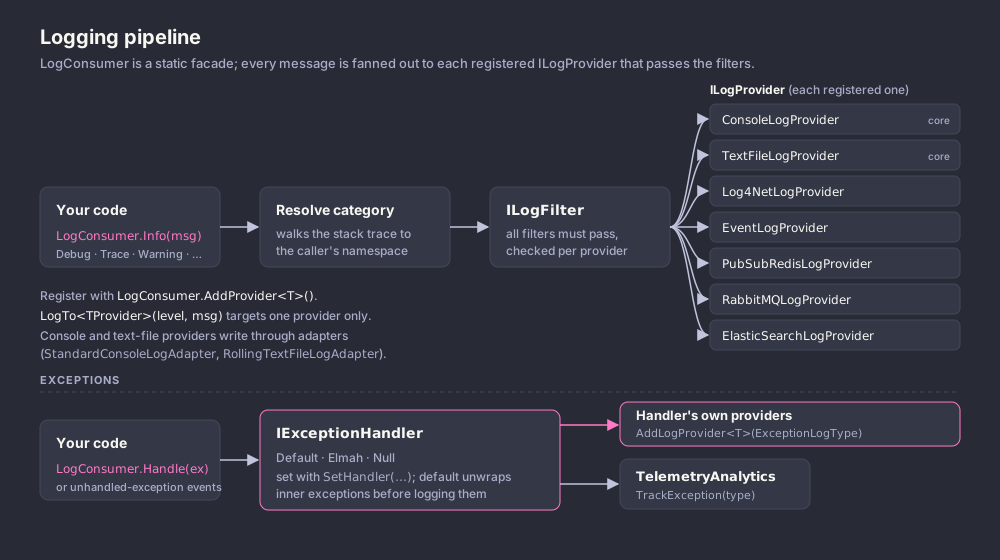
ElmahExceptionHandler implements IExceptionHandler. Set it as the handler with LogConsumer.SetHandler; after that, every LogConsumer.Handle(...) call goes to it.
For each exception the handler:
- Works out a category by walking the call stack and taking the full name of the first declaring type whose namespace does not start with
CrispyWaffle. - Builds one text block with the message, type name and stack trace of the exception and of each inner exception. While doing so, it calls
Error(category, message)on every provider added withExceptionLogType.Message, once per exception in the chain. - Writes the combined messages with
Error(category, ...)to every provider added withExceptionLogType.Full. - Calls ElmahCore's
ElmahExtensions.RaiseError(exception).
ElmahCore must be configured in your host (services.AddElmah(...) and app.UseElmah(), following the ElmahCore documentation) for the raised errors to be stored.
The list of additional providers is static. Providers added through one ElmahExceptionHandler instance are used by every instance, and there is no way to remove them.
Getting started
using CrispyWaffle.Elmah;
using CrispyWaffle.Log;
using ElmahCore.Mvc;

var builder = WebApplication.CreateBuilder(args);
builder.Services.AddElmah();

var app = builder.Build();
app.UseElmah();

LogConsumer.SetHandler(new ElmahExceptionHandler());

app.MapGet("/fail", () =>
{
    try
    {
        throw new InvalidOperationException("Something failed");
    }
    catch (Exception e)
    {
        LogConsumer.Handle(e);
        return Results.Problem();
    }
});

app.Run();
Reference
ElmahExceptionHandler
public sealed class ElmahExceptionHandler : IExceptionHandler — exception handler that raises exceptions in ELMAH and optionally copies them to other log providers.
| Member | Description |
|---|---|
ElmahExceptionHandler() |
Implicit parameterless constructor. |
Handle(Exception exception) |
Processes exception as described in How it works. |
Handle(object sender, UnhandledExceptionEventArgs args) |
Casts args.ExceptionObject to Exception and processes it. Suitable for AppDomain.CurrentDomain.UnhandledException. |
Handle(object sender, ThreadExceptionEventArgs args) |
Processes args.Exception. |
AddLogProvider<TLogProvider>(ExceptionLogType type) |
Resolves TLogProvider through ServiceLocator.Resolve<TLogProvider>(), adds it to the shared provider list with type, and returns it. TLogProvider must implement ILogProvider. |
ExceptionLogType is defined in the core package (CrispyWaffle.Log.Handlers): Message and Full. See Logging.
Examples
Copy exceptions to a text file log
Exceptions still go to ELMAH, and the full exception text is also written to the text file provider. TextFileLogProvider and its adapter must be resolvable through ServiceLocator.
using CrispyWaffle.Elmah;
using CrispyWaffle.Log;
using CrispyWaffle.Log.Handlers;
using CrispyWaffle.Log.Providers;

var handler = new ElmahExceptionHandler();
handler.AddLogProvider<TextFileLogProvider>(ExceptionLogType.Full).SetLevel(LogLevel.All);

LogConsumer.SetHandler(handler);

AppDomain.CurrentDomain.UnhandledException += handler.Handle;