payslip-archiver: un-locking my payslips so I never type that password again
Payroll e-mails a password-protected PDF every month, always with the same password. I wrote a small .NET 10 worker that watches the mailbox, strips the password and files clean copies in Dropbox — plus how it runs, what it costs in CPU and memory, and how LogStream and Grimoire keep it observable and secret-free.
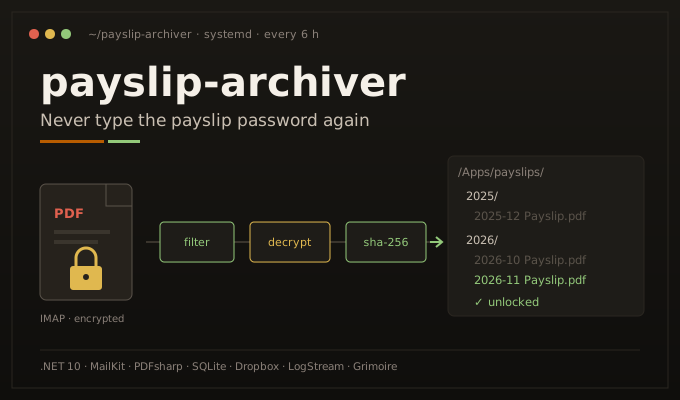
Every month my payslip arrives by e-mail as a password-protected PDF. Always the same password. That is perfectly reasonable for something travelling across the internet — and perfectly useless for an archive. So I built payslip-archiver: a small .NET 10 worker that watches a mailbox, takes the password off each payslip and files a clean copy in Dropbox under /<year>/<yyyy-MM> Payslip.pdf. This post covers the problem, the pain, the design, how it runs on my own infrastructure, what it costs in CPU and memory, and how it plugs into two other tools of mine: LogStream for logs and Grimoire for configuration and secrets.
The code is public under the AGPL-3.0 (there is a reason for that licence, further down): guibranco/payslip-archiver.
The problem
Payroll at my current employer is run in-house, and once a month it sends an e-mail with one attachment: the payslip, as a PDF encrypted with a user password. The password never changes.
Encrypting a document in transit is fine. The trouble is that the encryption travels with the file forever. Whatever I do with that PDF afterwards — download it, save it to a folder, forward it — it stays locked, and every single time I need it I am back to typing the same password.
And in Ireland you need your payslips more often than you’d think. Revenue, the Irish tax authority, is one reason. Renting is the other: letting agents and landlords usually ask for the last three to five payslips before they’ll offer a contract. So it’s never one PDF — it’s a handful, from the last few months, needed at short notice.
The pains
None of these is a big deal on its own. Together, every month, for years, they add up:
- The password, every time. Open the file on the laptop: password. On the phone: password, typed on a tiny keyboard. In a preview pane: no preview at all, because it is encrypted.
- Sharing is awkward. Sending a payslip to someone means sending a locked file and the password through another channel — or decrypting it by hand first, with whatever tool is at hand.
- No real archive. Whatever I hadn’t yet unlocked and filed lived only in my inbox, and the file names don’t help: payroll calls the attachment
PS21.PDF, which says nothing about the month. - The monthly ritual. For almost four years, every payslip went through the same routine: download the PDF, open it, type the password, print to PDF to get an unlocked copy, and drag that copy into Dropbox. Manual, forgettable, and easy to postpone until a letting agent asked for five of them at once.
- Search and preview tools don’t help. Encrypted PDFs aren’t indexed or thumbnailed by most file-sync and desktop tools, so even when the files were in a folder they were opaque.
Since I arrived in Ireland, almost four years ago, I've done the same thing every month: download the payslip, open it, type the password, print it to a new PDF without the password, and save that copy in Dropbox. It takes two minutes — when I remember. When I didn't, it became a batch job the day someone asked for my last three to five payslips.
Why build it
The honest answer is the same one I gave in the LogStream post: I could probably have glued something together with a no-code automation platform, a mail rule and a PDF step. But this is a document with my salary, tax and PPS details on it, and the whole point is to remove its only protection. I wanted that to happen on a machine I control, with credentials I control, writing to a folder only that app can see.
It is also small. A mailbox, a decryptor and an uploader. That is a weekend-sized project, and a good excuse to build a .NET 10 worker the way I like to build them at work: Clean Architecture, ports and adapters, real tests, a deploy pipeline that rolls itself back.
The solution, end to end
The setup is deliberately boring. Payslips go to a dedicated mailbox: I created one just for this on my own hosting (Nuvem Hospedagem gives me unlimited mailboxes), and an Outlook rule on my work inbox forwards payroll’s e-mail to it. The worker never touches my work mailbox, and the dedicated mailbox holds nothing but payslips. The worker polls that mailbox over IMAP — POP3 is supported too — on a fixed interval (30 minutes by default; in production it is every 6 hours, since a payslip arrives once a month) and runs one cycle:
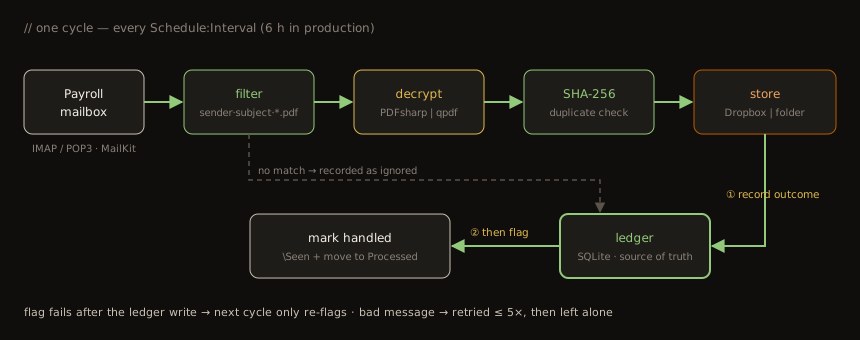
- Open one mailbox session and list candidates from the configured sender — by default only unread ones (
Mailbox:OnlyUnseen). - Skip anything the ledger already knows — archived, ignored, or out of retries.
- Fetch the rest, decrypt every matching PDF attachment and hash the result (SHA-256).
- Upload each new document. Dropbox never overwrites: a name clash is auto-renamed.
- Record the outcome in the ledger before flagging the e-mail as seen and moving it to
Processed.
The solution follows the same layering I use at work:
| Project | What lives there |
|---|---|
PayslipArchiver.Domain | Pure model: messages, attachments, pay periods, the path template. No I/O. |
PayslipArchiver.Application | The archive use case, the message filter, the ports (IMailboxSource, IPdfDecryptor, IArchiveStore, IProcessedLedger, IHeartbeat) and options. |
PayslipArchiver.Infrastructure | Adapters: MailKit (IMAP/POP3), PDFsharp and qpdf, Dropbox and file system, SQLite, Healthchecks.io, Grimoire, LogStream. |
PayslipArchiver.Worker | The host: a BackgroundService on a PeriodicTimer, systemd integration, the one-off authorize-dropbox command. |
Swapping Dropbox for a local folder (say, inside a Syncthing or OneDrive folder) is a config change — Archive:Provider=FileSystem — not a code change. Same for the PDF engine.
Idempotency: the ledger and the order of operations
The one design decision that matters in a job like this is: what happens when it crashes halfway? The mailbox is not a transactional store, Dropbox is not either, and there is no distributed transaction spanning both. So the worker keeps its own small source of truth — a SQLite file — and is strict about ordering:
CREATE TABLE IF NOT EXISTS messages (
    key          TEXT    PRIMARY KEY,
    status       TEXT    NOT NULL,
    attempts     INTEGER NOT NULL DEFAULT 0,
    message_id   TEXT    NULL,
    sender       TEXT    NULL,
    subject      TEXT    NULL,
    received_at  TEXT    NULL,
    note         TEXT    NULL,
    last_error   TEXT    NULL,
    created_at   TEXT    NOT NULL,
    updated_at   TEXT    NOT NULL
);

CREATE TABLE IF NOT EXISTS documents (
    sha256           TEXT    PRIMARY KEY,
    message_key      TEXT    NOT NULL REFERENCES messages(key),
    archive_path     TEXT    NOT NULL,
    period           TEXT    NOT NULL,
    source_file_name TEXT    NOT NULL,
    size_bytes       INTEGER NOT NULL,
    archived_at      TEXT    NOT NULL
);
- Upload fails → nothing is recorded as archived → the message is retried next cycle.
- Upload succeeds, then the process dies before the ledger write → nothing records the upload, so the next cycle uploads the payslip again. Dropbox never overwrites, so the archive ends up with a renamed second copy (
2026-10 Payslip (1).pdf). It’s a window of milliseconds and the cost is a duplicate file, not a lost payslip — but it’s the one gap in the ordering. - Ledger written, flagging the e-mail fails → the ledger already has it → next cycle skips the upload and just retries the flag.
- The same PDF arrives twice (a resend, a forward) → the SHA-256 of the decrypted content is already in
documents→ no duplicate file. - A poisoned message (wrong password, corrupt PDF) → retried up to
Pipeline:MaxAttempts(5) times, then left alone with a warning, so it never blocks the queue behind it.
\Seen flag is someone else's state, and POP3 can't flag anything at all — so the ledger, not the flag, decides whether a message was handled. That's what makes a crash, a retry or a resend harmless. The flag still narrows the search: with the default Mailbox:OnlyUnseen=true, a payslip that some other client marks as read before the next poll is never listed. Nothing else reads this mailbox, so I keep the default; set it to false and the ledger does all the filtering, while the Processed folder keeps the inbox short.
Taking the password off (and why the project is AGPL)
Payroll only gives me the user password, not the owner password. PDFsharp refuses to open such a file for modification, so “open, remove encryption, save” doesn’t work. The trick is to open it in Import mode and copy every page into a brand-new, unencrypted document: content and resources come along, the security handler doesn’t.
The licence follows from that choice. PDFsharp 6.5 is dual-licensed — AGPL-3.0 or commercial — and refuses to run until you declare which one. I declare the AGPL one, so the project itself ships under the AGPL-3.0. For anyone who can’t live with that, there is a second engine behind the same IPdfDecryptor port: Pdf:Engine=Qpdf shells out to qpdf (Apache-2.0), The tests run both engines against real fixtures encrypted with RC4-128, AES-128 and AES-256.
That second engine turned out to be more than a licensing escape hatch. My real payslip — the very first one the worker ever saw — is one that PDFsharp can’t parse, and production now runs on qpdf. The story is in How it’s going.
Which month is this?
A small thing that would otherwise be annoying: filing each slip under the right month. The worker tries, in order, the attachment name, the subject, and finally the e-mail date. It understands 2026-10, 202610, 2026-10-15, 10/2026, Oct 2026, October2026 and 2026 October. If none matches, it uses the e-mail date plus Naming:PeriodOffsetMonths — set it to -1 if slips arrive early the following month.
The path is a template, /{year}/{period} Payslip.pdf by default, so the Dropbox app folder ends up as:
/Apps/<app name>/
├── 2025/
│   ├── 2025-11 Payslip.pdf
│   └── 2025-12 Payslip.pdf
└── 2026/
    ├── 2026-01 Payslip.pdf
    └── …
The Dropbox app uses App folder scoped access with only files.content.write and files.metadata.read: the token can’t see anything else in my Dropbox. Authorisation is a one-off authorize-dropbox command using PKCE, so there isn’t even an app secret to store — just a refresh token.
How it runs
It runs as a systemd service on vinhedo3, one of my OCI VMs. A few choices worth calling out:
Type=notifywithAddSystemd(): systemd knows when the host is actually up, sosystemctl restartand the deploy script can wait for “active” instead of guessing.- Unprivileged user, hardened unit:
NoNewPrivileges,ProtectSystem=strict,ProtectHome,PrivateTmp,PrivateDevices, and a single writable path,/var/lib/payslip-archiver, where the ledger lives. - Self-contained single-file publish with
InvariantGlobalization: no .NET runtime to install on the host, no ICU. - Deploy on every push to
main: GitHub Actions builds, tests, publishes and copies the release over SSH (pinnedknown_hosts), then calls a root-owned installer that the deploy user may onlysudointo. The installer stages the release under/opt/payslip-archiver/releases/<stamp>, swaps a symlink, restarts the unit and waits for it to come up. If it doesn’t, the previous release and env file are put back and the deploy fails. Three releases are kept; the ledger survives every upgrade.
There is also a Docker Compose file and a RunOnce mode (one cycle, exit code 1 on failure) for cron or a systemd timer, but the long-running service is what I actually use.
CPU and memory
A worker that works for a second or two every six hours should cost close to nothing — and on this VM that matters. vinhedo3 is a small OCI instance: 2 vCPUs (AMD EPYC 7551), 952 MiB of RAM, Ubuntu 24.04. Here is what the service actually uses, measured on 16/11/2026 with a small script (payslip-metrics.sh) — once as it was running, 1 h 23 min after the last deploy, and once right after a restart:
| Metric | Value | Notes |
|---|---|---|
| Memory charged to the service | 33 MiB → 40 MiB | cgroup MemoryCurrent: right after a restart → after 1 h 20 min; about 4% of the VM's RAM |
| Memory peak since start | 33.8 MiB / 40.4 MiB | cgroup MemoryPeak — 4 min / 1 h 23 min after a start, empty cycles only |
| Resident set (RSS) | 89.4 MiB | includes the pages of the 88 MiB binary mapped into the process |
| Threads | 14–16 | runtime, GC, timer, LogStream batching |
| CPU, startup + one empty cycle | ~5 s (4.96 / 5.33) | two restarts; ~2 s of wall-clock time — both vCPUs busy (JIT, Grimoire, IMAP) |
| CPU, idle | ~0.03–0.04% of one core | once settled — roughly half a minute of CPU a day; ~0.13% in the first 2 minutes after a start |
| CPU since the last deploy | 9.41 s in 1 h 23 min | 0.19% average, dominated by startup |
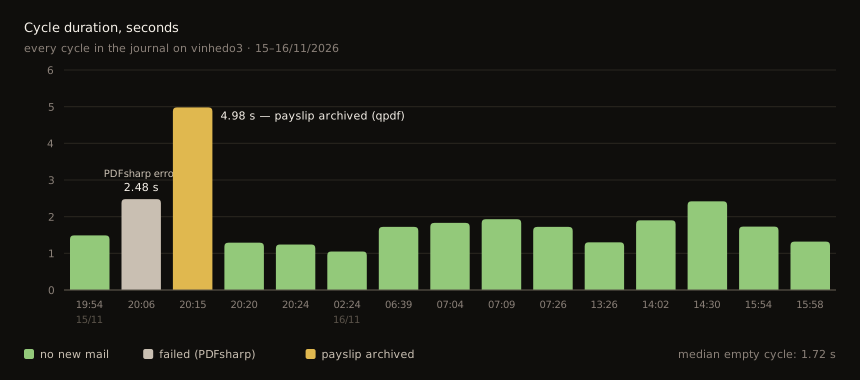
| Cycle, no new mail | 1.05–2.42 s (median 1.72 s) | IMAP login + search + logout, 13 cycles |
| Cycle, payslip archived | 4.98 s | fetch + qpdf + hash + Dropbox upload + create Processed |
| Restart → first cycle | 4–6 s (restart) · 7–10 s (deploy) | from "shutting down" to "cycle starting" in the logs: stop, process start, Grimoire, host start |
| Binary | 87.7 MiB | self-contained single file — the .NET runtime is inside |
| All kept releases | 264 MiB | 3 releases, for rollback |
| Data directory | 13 MiB | ledger + the single-file extraction cache |
| Ledger | 24 KiB | SQLite |
Two of those numbers are worth a sentence each:
- RSS vs. cgroup memory.
pssays 84–89 MiB, systemd says 33–40 MiB. RSS counts every page mapped into the process, including the read-only pages of the 88 MiB single-file binary, which are page cache the kernel can drop and reload at any time. The cgroup figure is what the service is actually charged for. On a 1 GB box, 40 MiB is the number that matters. - The CPU is front-loaded. A fresh restart burns about 5 seconds of CPU in roughly 2 seconds of wall-clock time — both vCPUs busy JIT-compiling the app, fetching configuration from Grimoire and running the first IMAP session. Two restarts gave the same answer, 4.96 s and 5.33 s. Idle, it’s a different process. Ten minutes sampled every 5 seconds show the shape:
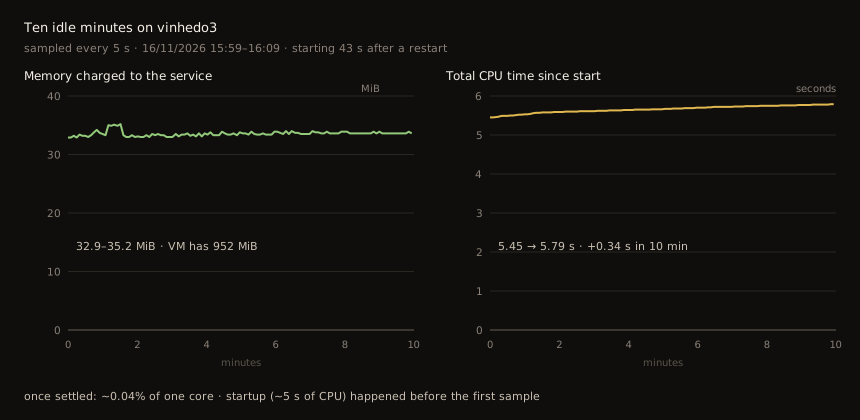
In the first minute and a half after a start it uses about 0.13% of a core — most likely the runtime re-compiling hot methods in the background (tiered JIT) — and memory briefly climbs to 35 MiB before a garbage collection brings it back to 33. After that it settles at about 0.04% of one core: the LogStream batch timer and the runtime’s housekeeping. An hour in, it was down to 0.03%. That’s roughly half a minute of CPU a day, plus four cycles of a second or two each. That’s why “9.4 s since the last deploy” mostly measures the deploy.
The binary is the one place it isn’t small. 88 MiB is the price of a self-contained publish: no .NET runtime to install or patch on the host, at the cost of disk. With three releases kept for rollback, that is 264 MiB — fine for this VM, and a trade I’d make again. A trimmed or framework-dependent build would shrink it a lot.
Why the rest stays small, by design rather than by tuning:
- No web server. It is a generic host, not ASP.NET Core — there is nothing listening on a port.
- Sleeps between cycles. A single
PeriodicTimertick every 6 hours in production; between ticks the process is idle. - One mailbox session per cycle, at most 50 messages per cycle, so a large backlog is drained gradually instead of in one memory spike.
- qpdf only exists for a moment. With
Pdf:Engine=Qpdfthe worker starts aqpdfchild process per attachment (with a 60-second timeout) and it exits as soon as the file is written — once a month, in practice. - Payslips are tiny. Hashing happens in memory. My first archived payslip, decrypted, is 7,857 bytes — under 8 KB.
- Invariant globalisation: no ICU data loaded.
MemoryCurrent, MemoryPeak, CPUUsageNSec), /proc/<pid>/status, the sizes on disk, and the "cycle starting / cycle finished" pairs in the journal. It prints Markdown. --cycle restarts the unit and measures startup plus one cycle; --watch 600 samples every 5 seconds.
Monitoring: three layers
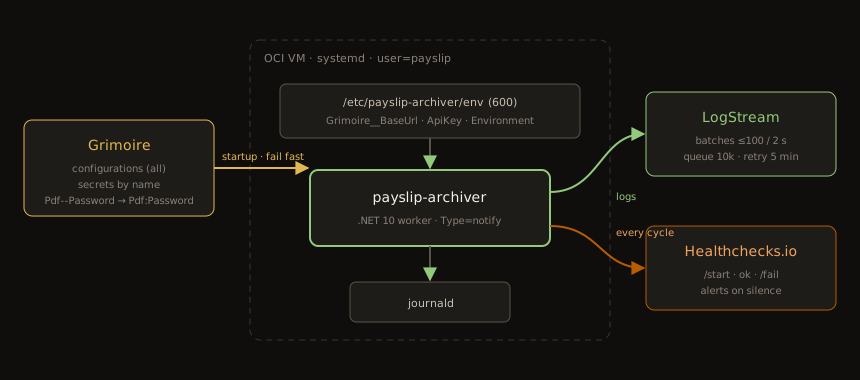
A job that runs silently in the background has one failure mode that matters: it stops, and nobody notices for months. So it reports in three ways:
- Heartbeat — Healthchecks.io. Every cycle pings
/startwhen it begins, the bare URL on success and/failon failure, with the cycle report as the body. If the pings stop arriving — the VM is down, the service crashed, systemd gave up — Healthchecks.io notices the silence and alerts me. It’s the same dead man’s switch I use for my other systemd services. - Local logs — journald. The console logger stays on;
journalctl -u payslip-archiver -fis still the first thing I look at on the box. - Central logs — LogStream. Everything that matters is also shipped off the VM, so I can see it next to every other service.
LogStream
LogStream is the log server I wrote for my own infrastructure. This is one of the first .NET services to ship to it, through the Serilog.Sinks.LogStream NuGet package, plugged in behind the standard ILogger so the rest of the code doesn’t know it exists:
var logger = new LoggerConfiguration()
    .MinimumLevel.Verbose() // Logging:LogLevel rules filter first
    .WriteTo.LogStream(
        sink =>
        {
            sink.ServerUrl = serverUri;
            sink.ApiKey = options.ApiKey!.Trim();
            sink.ApiToken = options.ApiToken!.Trim();
            sink.AppId = string.IsNullOrWhiteSpace(options.AppId) ? Environment.MachineName : options.AppId.Trim();
            sink.RequestTimeout = TimeSpan.FromSeconds(10);
        },
        batching =>
        {
            batching.QueueLimit = 10_000;
            batching.RetryTimeLimit = TimeSpan.FromMinutes(5);
        },
        restrictedToMinimumLevel: options.MinimumLevel)
    .CreateLogger();

logging.Services.AddSingleton<ILoggerProvider>(_ => new SerilogLoggerProvider(logger, dispose: true));
The rules I care about for a background job:
- Logging never blocks a cycle. Entries go out in background batches (up to 100 every 2 seconds). If LogStream is slow or down, up to 10,000 entries wait in memory, failing batches are retried for 5 minutes and then dropped. The payslip still gets archived.
- The last batch is flushed on shutdown. The provider is registered through a factory, not as an instance, because the container only disposes what it created — and disposing it is what flushes the queue when systemd stops the service.
- Opt-in and with a kill switch. Shipping only starts when server, key and token are all set;
LogStream:Enabled=falseturns it off without deleting anything. The first log lines say whether shipping is enabled, or why not.
Because the code logs through [LoggerMessage] source-generated methods, what reaches LogStream is not just a line of text. Every event carries the message template, the named properties, the event ID and the logger category; the app ID defaults to the host name, so every entry says vinhedo3. The archive event, for example:
{
  "Key": "imap:…:1",
  "FileName": "PS21.PDF",
  "Path": "/2026/2026-10 Payslip.pdf",
  "Period": "2026-10",
  "PeriodSource": "Subject",
  "Bytes": 7857,
  "EventId": { "Id": 1001, "Name": "LogArchived" },
  "SourceContext": "PayslipArchiver.Application.Archiving.ArchivePayslips"
}
And exceptions arrive as structure too — type, message, source and the inner exception — which is how the PDFsharp failure further down was diagnosed from the LogStream UI in a minute, without opening a shell on the VM. The user agent (payslip-archiver/1.1.0 (Serilog.Sinks.LogStream/1.0.5)) carries the app version, so I can see which release sent each line.
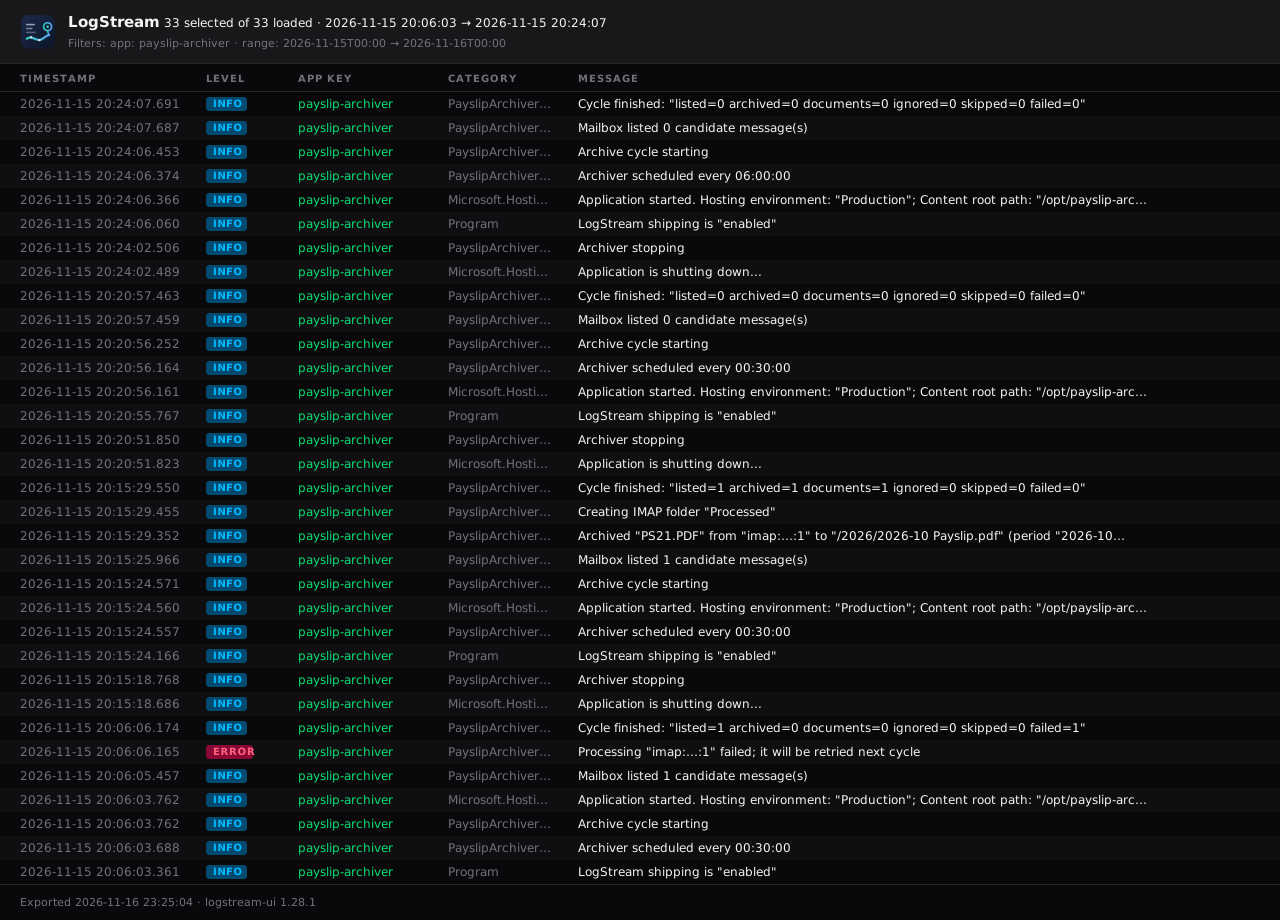
Here is the whole first night in the LogStream UI, exported from the app as an SVG (message keys redacted):
Grimoire: no secrets on the host, none in GitHub
This service holds a lot of secrets for its size: the mailbox password, the PDF password, the Dropbox refresh token, the Healthchecks.io ping URL and the LogStream token. Before Grimoire, they would have lived either in GitHub Actions secrets (rendered into an env file on deploy) or in a file on the VM. Neither is terrible; both mean the secrets are spread around, and changing one means a redeploy or an SSH session.
Grimoire is my self-hosted vault and configuration manager — an ASP.NET Core API with a React UI, with separate Management and Consumer APIs. The host only knows three bootstrap keys:
# /etc/payslip-archiver/env — chmod 600, read by systemd before it drops privileges
Grimoire__BaseUrl=https://api.grimoire.example.com
Grimoire__ApiKey=
Grimoire__Environment=production
At startup a custom IConfigurationProvider reads, for that environment, every configuration entry (GET consumer/configurations) and a fixed list of secrets by name (GET consumer/secrets/{name}), using the Azure Key Vault convention of -- for : — so Pdf--Password becomes Pdf:Password. Grimoire deliberately can’t list secrets, which is why the names are fixed.
One bug worth sharing, because it is easy to make — and because the safety net caught it. HostApplicationBuilder registers a DOTNET_-prefixed environment-variable source ahead of appsettings.json. My first version inserted Grimoire before the first environment-variable source it found, which meant position zero. Configuration in .NET is “last one wins”, so the empty defaults in appsettings.json ("Host": "", "Password": "") overrode every value from Grimoire. The v1.0.0 deploy failed options validation — mailbox host, username and password required — the service never became active, and the deploy failed instead of leaving a half-configured worker running. The fix: Grimoire now goes right before the last un-prefixed environment-variable source, so it overrides the JSON file while a variable set on the host still overrides a single Grimoire value.
The end result: the only secrets in the GitHub repository are how to reach the VM and the Grimoire key. Everything else is changed in the Grimoire UI and picked up with systemctl restart.
How it's going
The timeline, from the repository:
| Date | Milestone |
|---|---|
| 21/10/2026 | Solution scaffolded; AGPL-3.0 + PDFsharp 6.5, Dependabot, build and deploy workflows |
| 15/11/2026 | Configuration and secrets moved to Grimoire (and the precedence fix) |
| 15/11/2026 | Logs shipped to LogStream |
| 15/11/2026, 20h06 | First production cycle with everything wired up — PDFsharp can't parse the real payslip |
| 15/11/2026, 20h15 | Pdf:Engine=Qpdf in Grimoire, restart — first payslip archived: October 2026 |
| 15/11/2026, 20h24 | Interval changed from 30 minutes to 6 hours, in Grimoire |
| 16/11/2026 | Four Dependabot merges, four automatic deploys before 07h30 |
The first night, straight out of LogStream (message key redacted):
20:06:03.762 [INFO]  Archive cycle starting
20:06:05.457 [INFO]  Mailbox listed 1 candidate message(s)
20:06:06.165 [ERROR] Processing "imap:…:1" failed; it will be retried next cycle
                     PdfDecryptionException: PDFsharp could not open the document: Token '16' was not expected.
                      ---> PdfSharp.Pdf.IO.PdfReaderException: Token '16' was not expected.
20:06:06.174 [INFO]  Cycle finished: "listed=1 archived=0 documents=0 ignored=0 skipped=0 failed=1"
20:15:18.686 [INFO]  Application is shutting down...
20:15:24.571 [INFO]  Archive cycle starting
20:15:25.966 [INFO]  Mailbox listed 1 candidate message(s)
20:15:29.352 [INFO]  Archived "PS21.PDF" from "imap:…:1" to "/2026/2026-10 Payslip.pdf" (period "2026-10" from Subject, 7857 bytes)
20:15:29.455 [INFO]  Creating IMAP folder "Processed"
20:15:29.550 [INFO]  Cycle finished: "listed=1 archived=1 documents=1 ignored=0 skipped=0 failed=0"
A few things in those lines are the design doing its job:
- The real payslip broke PDFsharp. All my test fixtures were made with qpdf and opened fine; payroll’s actual file didn’t. PDFsharp’s parser hit a token it didn’t expect while reading an indirect object and gave up. That is not a wrong password and not a corrupt download: it’s a file that is valid enough for every PDF viewer but structured in a way PDFsharp’s reader doesn’t accept.
- The failure didn’t lose anything. The decryptor wrapped the parser error in a
PdfDecryptionException, the ledger recorded the attempt, the e-mail stayed unread, and the cycle closed withfailed=1— which also sent a/failping to Healthchecks.io. - The fix was a configuration change, not a deploy. I set
Pdf:EnginetoQpdfin Grimoire and restarted. The restart at 20:15 runs the same release (releases/20261115200555), and the retry happened on the startup cycle instead of waiting for the next tick. Nine minutes from error to archived payslip, without writing a line of code — that’s what theIPdfDecryptorport bought me. The only manual step was installing qpdf itself onvinhedo3over SSH —bootstrap.shdidn’t install it, because PDFsharp was the default. That’s now being added to the bootstrap script, so a fresh host works with either engine. - The pay period came from the subject, because payroll names the file
PS21.PDF— a name that says nothing about the month. That is exactly why the resolver falls back from file name to subject to e-mail date. - The
Processedfolder didn’t exist until the first payslip needed it; the worker created it on demand. - Tuning is also configuration. At 20:24 I moved the interval from 30 minutes to 6 hours in Grimoire and restarted; the next line reads
Archiver scheduled every 06:00:00.
The next morning, Dependabot opened four dependency PRs (Microsoft packages, test SDK, coverage action, Dropbox.Api 7.4.0 → 7.4.1). Each merge to main built, tested and deployed itself — LogStream shows the user agent moving from payslip-archiver/1.1.0 to 1.1.1, 1.1.2 and on as GitVersion bumped the patch — and each new release came up in under ten seconds and ran a clean cycle. I didn’t touch the server.
That October payslip arrived before the Outlook rule existed, so I forwarded it by hand; November’s will be the first to make the whole trip on its own.
October 2026 is the first payslip in the archive: the worker starts from now and fills up month by month, one unlocked file at a time.
And the ritual is gone. No more download, password, print to PDF, drag into Dropbox. The mailbox is checked every six hours, and by the time I think about a payslip it’s already in /2026/ with the right name and no password. The next time a letting agent asks for the last five, it’s a Dropbox folder, not an evening.
What I’d still like to add:
- other password-protected documents from the same kind of sender (P60, benefit statements) with their own templates;
- a “missing month” alert. Healthchecks.io catches a worker that stops; it can’t catch a worker that runs perfectly every six hours while no payslip arrives — a forwarding rule that silently stops, say. A check like “no document for the previous month by day N” would close that gap.
A small tool, built properly
payslip-archiver solves a tiny, recurring annoyance — and that is exactly the kind of problem worth automating, because it never goes away on its own. The interesting part isn't the PDF trick; it's everything around it: an order of operations that makes crashes harmless, a heartbeat that notices silence, logs that leave the VM, and secrets that live in one place. It is also the first service where LogStream and Grimoire work together end to end, which was half the reason to build it.
References
- Guilherme Branco Stracini. payslip-archiver. github.com
- Guilherme Branco Stracini. logstream-server. github.com
- PDFsharp & MigraDoc. PDFsharp licensing. docs.pdfsharp.net
- qpdf. qpdf documentation. qpdf.readthedocs.io
- MailKit. MailKit. github.com
- Dropbox. OAuth guide (PKCE, app folder access). developers.dropbox.com
- Healthchecks.io. Pinging API (/start, /fail). healthchecks.io
- Microsoft. .NET Generic Host — systemd integration. learn.microsoft.com
Categories