Deploying a C# Application to Ubuntu VPS with Nginx, SSL and Load Balancing
Step-by-step guide for deploying a .NET application — API, Swagger, HealthChecks and background worker — to an OCI Ubuntu VPS using Nginx as reverse proxy with load balancing and Certbot SSL.
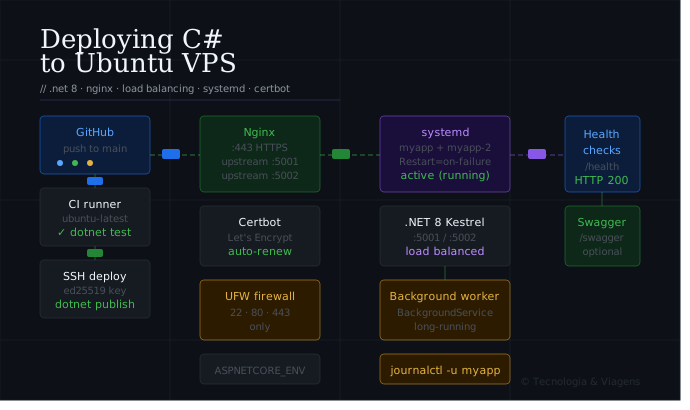
A step-by-step guide for deploying a .NET application — REST API, Swagger, HealthChecks and a long-running background worker — to an OCI Ubuntu VPS with Nginx acting as reverse proxy and load balancer, SSL provided by Let's Encrypt via Certbot.
Based on: a production .NET 8 deployment on an OCI Ubuntu 22.04 VPS. Tested on: Ubuntu 22.04 / 24.04 (LTS), .NET 8, Nginx, Certbot.
1. Prerequisites
On your GitHub repository:
| Secret | Description |
|---|---|
SSH_HOST |
Server IP or hostname |
SSH_USER |
Deploy user (e.g. deploy) |
SSH_PORT |
SSH port (usually 22) |
SSH_PRIVATE_KEY |
Private SSH key for the deploy user |
HEALTH_CHECK_URL |
Full URL to /health endpoint |
Add additional secrets for anything app-specific (connection strings, API keys, etc.).
2. Server preparation
SSH into the server as root and update the system:
ssh root@your-server-ip
apt update && apt upgrade -y
apt install -y curl wget git unzip software-properties-common \
               nginx certbot python3-certbot-nginx ufw
3. Install .NET Runtime
Microsoft provides an official repository for all Ubuntu LTS versions.
# Add Microsoft package repository
wget https://packages.microsoft.com/config/ubuntu/$(lsb_release -rs)/packages-microsoft-prod.deb -O packages-microsoft-prod.deb
dpkg -i packages-microsoft-prod.deb
rm packages-microsoft-prod.deb

apt update

# Runtime only (for production — no SDK needed)
apt install -y dotnet-runtime-8.0
apt install -y aspnetcore-runtime-8.0

# Optional: install the full SDK if you want to build on the server
# apt install -y dotnet-sdk-8.0
Verify:
dotnet --version
dotnet --list-runtimes
4. Create application user and directory
APP=myapp

# System user — no login shell, no home directory
useradd --system --no-create-home --shell /usr/sbin/nologin $APP

# Application directory
mkdir -p /opt/$APP
chown $APP:$APP /opt/$APP
chmod 750 /opt/$APP

# Deploy user — GitHub Actions SSHs in as this user
useradd --system --create-home --shell /bin/bash deploy
chown -R deploy:deploy /opt/$APP
5. Deploy SSH key and sudoers
SSH key
On your local machine:
ssh-keygen -t ed25519 -C "github-actions-deploy" -f ~/.ssh/deploy_myapp -N ""
Copy the public key to the server:
ssh-copy-id -i ~/.ssh/deploy_myapp.pub deploy@your-server-ip
⚠️ if ssh-copy-id fails
Cloud providers (OCI, AWS, Azure) typically provision VMs with a defaultubuntu user and password authentication disabled, so ssh-copy-id targeting the deploy user may fail before that user exists or has SSH configured. Log in as ubuntu (or via the provider's web console) and append the key manually instead.
Manual alternative — run on the server as ubuntu or root:
# Get your public key on your local machine first:
# cat ~/.ssh/deploy_myapp.pub

sudo mkdir -p /home/deploy/.ssh
echo "PASTE_PUBLIC_KEY_HERE" | sudo tee -a /home/deploy/.ssh/authorized_keys
sudo chmod 700 /home/deploy/.ssh
sudo chmod 600 /home/deploy/.ssh/authorized_keys
sudo chown -R deploy:deploy /home/deploy/.ssh
Add the private key as the SSH_PRIVATE_KEY GitHub Secret.
Sudoers
cat > /etc/sudoers.d/$APP-deploy << EOF
deploy ALL=(ALL) NOPASSWD: /usr/bin/systemctl restart $APP
deploy ALL=(ALL) NOPASSWD: /usr/bin/systemctl restart ${APP}-2
deploy ALL=(ALL) NOPASSWD: /usr/bin/systemctl start $APP
deploy ALL=(ALL) NOPASSWD: /usr/bin/systemctl start ${APP}-2
deploy ALL=(ALL) NOPASSWD: /usr/bin/systemctl stop $APP
deploy ALL=(ALL) NOPASSWD: /usr/bin/systemctl stop ${APP}-2
deploy ALL=(ALL) NOPASSWD: /usr/bin/systemctl status $APP
deploy ALL=(ALL) NOPASSWD: /usr/bin/systemctl status ${APP}-2
EOF

chmod 440 /etc/sudoers.d/$APP-deploy
visudo -c -f /etc/sudoers.d/$APP-deploy
The second instance ($APP-2) is needed for load balancing — covered in section 12.
6. Publish and deploy the application
The recommended production deployment for .NET is a self-contained publish or framework-dependent publish. We use framework-dependent here (smaller artifact, relies on the runtime installed in step 3).
First deploy (manual)
As the deploy user:
su - deploy
git clone git@github.com:your-org/your-repo.git /opt/$APP
cd /opt/$APP

# Publish for Linux x64
dotnet publish src/MyApp.Api/MyApp.Api.csproj \
  --configuration Release \
  --runtime linux-x64 \
  --no-self-contained \
  --output /opt/$APP/publish
If your repository is private, add the deploy key as a GitHub Deploy Key (Settings → Deploy keys) with read-only access.
7. Environment configuration
.NET reads configuration from appsettings.json, appsettings.Production.json, and environment variables. In production, sensitive values go in environment variables — never committed to the repository.
Create the environment file that systemd will load:
cat > /opt/$APP/environment << EOF
ASPNETCORE_ENVIRONMENT=Production
ASPNETCORE_URLS=http://127.0.0.1:5001

# Database
ConnectionStrings__DefaultConnection=Server=127.0.0.1;Database=myapp;User=myapp;Password=change-me;

# Secrets
AppSettings__JwtSecret=change-me-to-a-strong-random-value
AppSettings__ApiKey=change-me

# Swagger (disable in production if preferred)
Swagger__Enabled=true
EOF

chown $APP:$APP /opt/$APP/environment
chmod 640 /opt/$APP/environment
Convention:
ConnectionStrings__DefaultConnectionin environment variables maps toConnectionStrings:DefaultConnectioninappsettings.json— double underscore (__) replaces the colon (:) separator.
8. Configure HealthChecks, Swagger and background worker
These are configured in your C# code, but here is the expected setup so that Nginx can route correctly.
Program.cs — minimal example
var builder = WebApplication.CreateBuilder(args);

// API
builder.Services.AddControllers();

// Swagger
builder.Services.AddEndpointsApiExplorer();
builder.Services.AddSwaggerGen();

// HealthChecks
builder.Services.AddHealthChecks()
    .AddCheck("self", () => HealthCheckResult.Healthy())
    .AddSqlServer(builder.Configuration.GetConnectionString("DefaultConnection")!);

// Background worker
builder.Services.AddHostedService<MyBackgroundWorker>();

var app = builder.Build();

// Swagger — conditionally enabled
if (app.Configuration.GetValue<bool>("Swagger:Enabled"))
{
    app.UseSwagger();
    app.UseSwaggerUI(c => c.SwaggerEndpoint("/swagger/v1/swagger.json", "MyApp API v1"));
}

app.MapControllers();

// HealthCheck endpoints
app.MapHealthChecks("/health", new HealthCheckOptions
{
    ResponseWriter = UIResponseWriter.WriteHealthCheckUIResponse
});
app.MapHealthChecks("/health/live", new HealthCheckOptions
{
    Predicate = _ => false   // liveness — always returns 200 if app is running
});
app.MapHealthChecks("/health/ready", new HealthCheckOptions
{
    Predicate = hc => hc.Tags.Contains("ready")
});

app.Run();
Background worker — MyBackgroundWorker.cs
public class MyBackgroundWorker : BackgroundService
{
    private readonly ILogger<MyBackgroundWorker> _logger;

    public MyBackgroundWorker(ILogger<MyBackgroundWorker> logger)
        => _logger = logger;

    protected override async Task ExecuteAsync(CancellationToken stoppingToken)
    {
        _logger.LogInformation("Background worker started");

        while (!stoppingToken.IsCancellationRequested)
        {
            try
            {
                // Your long-running work here
                await DoWorkAsync(stoppingToken);
            }
            catch (Exception ex) when (ex is not OperationCanceledException)
            {
                _logger.LogError(ex, "Background worker error");
            }

            await Task.Delay(TimeSpan.FromSeconds(30), stoppingToken);
        }
    }

    private async Task DoWorkAsync(CancellationToken ct)
    {
        // ...
    }
}
The background worker runs inside the same process as the API — no separate service needed. Systemd manages the entire process lifecycle.
9. Systemd service
cat > /etc/systemd/system/$APP.service << EOF
[Unit]
Description=MyApp .NET API
After=network.target

[Service]
Type=simple
User=$APP
Group=$APP
WorkingDirectory=/opt/$APP/publish
ExecStart=/usr/bin/dotnet /opt/$APP/publish/MyApp.Api.dll
Restart=on-failure
RestartSec=5s

# Environment file
EnvironmentFile=/opt/$APP/environment

# Logging → journald
StandardOutput=journal
StandardError=journal
SyslogIdentifier=$APP

# Graceful shutdown — give the app time to finish in-flight requests
TimeoutStopSec=30

[Install]
WantedBy=multi-user.target
EOF

systemctl daemon-reload
systemctl enable $APP
systemctl start $APP
systemctl status $APP
Watch live logs:
journalctl -u $APP -f
10. Nginx site
cat > /etc/nginx/sites-available/$APP << 'NGINXEOF'
upstream myapp_backend {
    # Single instance — for load balancing add more servers (see section 12)
    server 127.0.0.1:5001;

    keepalive 32;
}

server {
    listen 80;
    server_name your-domain.com;
    return 301 https://$host$request_uri;
}

server {
    listen 443 ssl;
    server_name your-domain.com;

    # SSL — Certbot fills these in automatically
    ssl_certificate     /etc/letsencrypt/live/your-domain.com/fullchain.pem;
    ssl_certificate_key /etc/letsencrypt/live/your-domain.com/privkey.pem;
    include             /etc/letsencrypt/options-ssl-nginx.conf;
    ssl_dhparam         /etc/letsencrypt/ssl-dhparams.pem;

    # Security headers
    add_header Strict-Transport-Security "max-age=63072000; includeSubDomains" always;
    add_header X-Content-Type-Options    "nosniff"                             always;
    add_header X-Frame-Options           "SAMEORIGIN"                          always;
    add_header Referrer-Policy           "strict-origin-when-cross-origin"     always;

    # ── API ──────────────────────────────────────────────────────────────────
    location / {
        proxy_pass         http://myapp_backend;
        proxy_http_version 1.1;
        proxy_set_header   Connection        "";   # required for keepalive upstream
        proxy_set_header   Host              $host;
        proxy_set_header   X-Real-IP         $remote_addr;
        proxy_set_header   X-Forwarded-For   $proxy_add_x_forwarded_for;
        proxy_set_header   X-Forwarded-Proto $scheme;
        proxy_read_timeout 60s;
    }

    # ── Swagger UI ───────────────────────────────────────────────────────────
    location /swagger {
        proxy_pass         http://myapp_backend;
        proxy_http_version 1.1;
        proxy_set_header   Connection        "";
        proxy_set_header   Host              $host;
        proxy_set_header   X-Real-IP         $remote_addr;
        proxy_set_header   X-Forwarded-For   $proxy_add_x_forwarded_for;
        proxy_set_header   X-Forwarded-Proto $scheme;
    }

    # ── HealthChecks ─────────────────────────────────────────────────────────
    location /health {
        proxy_pass         http://myapp_backend;
        proxy_http_version 1.1;
        proxy_set_header   Connection        "";
        proxy_set_header   Host              $host;
        proxy_set_header   X-Real-IP         $remote_addr;
        proxy_set_header   X-Forwarded-For   $proxy_add_x_forwarded_for;
        proxy_set_header   X-Forwarded-Proto $scheme;
        access_log off;   # avoid polluting logs with monitoring checks
    }
}
NGINXEOF

ln -s /etc/nginx/sites-available/$APP /etc/nginx/sites-enabled/
nginx -t
systemctl reload nginx
11. SSL with Certbot
Make sure the domain’s DNS A record already points to the server’s public IP before running:
certbot --nginx -d your-domain.com
Test renewal:
certbot renew --dry-run
Certbot installs a systemd timer that renews certificates automatically before they expire.
12. GitHub Actions workflows
ci.yml — runs on every pull request
# .github/workflows/ci.yml
name: CI

on:
  pull_request:
  workflow_dispatch:

jobs:
  build-and-test:
    runs-on: ubuntu-latest

    steps:
      - name: Checkout
        uses: actions/checkout@v4
        with:
          fetch-depth: 0

      - name: Setup .NET
        uses: actions/setup-dotnet@v4
        with:
          dotnet-version: '8.0.x'

      - name: Restore
        run: dotnet restore

      - name: Build
        run: dotnet build --no-restore --configuration Release

      - name: Test
        run: dotnet test --no-build --configuration Release --verbosity normal \
               /p:CollectCoverage=true /p:CoverletOutputFormat=opencover
release.yml — runs on push to main, deploys to the server
# .github/workflows/release.yml
name: Release

on:
  push:
    branches: [main]
  workflow_dispatch:

jobs:
  build-and-test:
    runs-on: ubuntu-latest
    steps:
      - uses: actions/checkout@v4
      - uses: actions/setup-dotnet@v4
        with:
          dotnet-version: '8.0.x'
      - run: dotnet restore
      - run: dotnet build --no-restore --configuration Release
      - run: dotnet test --no-build --configuration Release

  publish:
    needs: build-and-test
    runs-on: ubuntu-latest

    steps:
      - name: Checkout
        uses: actions/checkout@v4

      - name: Setup .NET
        uses: actions/setup-dotnet@v4
        with:
          dotnet-version: '8.0.x'

      - name: Publish
        run: |
          dotnet publish src/MyApp.Api/MyApp.Api.csproj \
            --configuration Release \
            --runtime linux-x64 \
            --no-self-contained \
            --output ./publish

      - name: Create release archive
        run: tar -czf publish.tar.gz -C publish .

      - name: Upload artifact
        uses: actions/upload-artifact@v4
        with:
          name: publish
          path: publish.tar.gz
          retention-days: 1

  deploy:
    needs: publish
    runs-on: ubuntu-latest

    steps:
      - name: Download artifact
        uses: actions/download-artifact@v4
        with:
          name: publish

      - name: Set up SSH
        run: |
          mkdir -p ~/.ssh
          echo "${{ secrets.SSH_PRIVATE_KEY }}" > ~/.ssh/id_ed25519
          chmod 600 ~/.ssh/id_ed25519
          ssh-keyscan -p ${{ secrets.SSH_PORT }} ${{ secrets.SSH_HOST }} >> ~/.ssh/known_hosts

      - name: Upload publish archive
        run: |
          scp -P ${{ secrets.SSH_PORT }} \
              publish.tar.gz \
              ${{ secrets.SSH_USER }}@${{ secrets.SSH_HOST }}:/tmp/publish.tar.gz

      - name: Deploy
        run: |
          ssh -p ${{ secrets.SSH_PORT }} \
              ${{ secrets.SSH_USER }}@${{ secrets.SSH_HOST }} << 'REMOTE'
            set -e

            echo "→ Stopping service"
            sudo systemctl stop myapp

            echo "→ Extracting new publish"
            rm -rf /opt/myapp/publish
            mkdir -p /opt/myapp/publish
            tar -xzf /tmp/publish.tar.gz -C /opt/myapp/publish
            rm /tmp/publish.tar.gz

            echo "→ Fixing permissions"
            chown -R myapp:myapp /opt/myapp/publish
            chmod +x /opt/myapp/publish/MyApp.Api

            echo "→ Starting service"
            sudo systemctl start myapp

            echo "→ Waiting for service to come up"
            sleep 5
          REMOTE

      - name: Health check
        run: |
          STATUS=$(curl -s -o /dev/null -w "%{http_code}" \
                   --retry 5 --retry-delay 3 \
                   "${{ secrets.HEALTH_CHECK_URL }}")
          if [ "$STATUS" != "200" ]; then
            echo "Health check failed — HTTP $STATUS"
            exit 1
          fi
          echo "Health check passed — HTTP $STATUS"
13. Optional: Load balancing — multiple instances
Running two instances of the application on different ports allows Nginx to distribute traffic and perform zero-downtime deployments by restarting one instance at a time.
Second systemd service
# Create a second environment file pointing to port 5002
cp /opt/$APP/environment /opt/$APP/environment-2
sed -i 's/5001/5002/' /opt/$APP/environment-2

cat > /etc/systemd/system/${APP}-2.service << EOF
[Unit]
Description=MyApp .NET API (instance 2)
After=network.target

[Service]
Type=simple
User=$APP
Group=$APP
WorkingDirectory=/opt/$APP/publish
ExecStart=/usr/bin/dotnet /opt/$APP/publish/MyApp.Api.dll
Restart=on-failure
RestartSec=5s
EnvironmentFile=/opt/$APP/environment-2
StandardOutput=journal
StandardError=journal
SyslogIdentifier=${APP}-2
TimeoutStopSec=30

[Install]
WantedBy=multi-user.target
EOF

systemctl daemon-reload
systemctl enable ${APP}-2
systemctl start ${APP}-2
Update Nginx upstream block
upstream myapp_backend {
    server 127.0.0.1:5001;
    server 127.0.0.1:5002;

    keepalive 32;
}
nginx -t && systemctl reload nginx
Zero-downtime deploy with rolling restart
Update the deploy step in release.yml to restart one instance at a time:
# Rolling restart — drain instance 1, restart, then instance 2
echo "→ Restarting instance 1"
sudo systemctl restart myapp
sleep 8

echo "→ Restarting instance 2"
sudo systemctl restart myapp-2
sleep 5
Nginx automatically routes requests to the remaining healthy instance while the other restarts.
14. Optional: EF Core database migrations
If your application uses Entity Framework Core, run migrations as part of the deploy:
# In the deploy step, after extracting the publish archive:
echo "→ Running EF migrations"
dotnet /opt/$APP/publish/MyApp.Api.dll --migrate-only
Or using the EF CLI directly:
dotnet ef database update \
  --project src/MyApp.Infrastructure \
  --startup-project src/MyApp.Api \
  --connection "$CONNECTION_STRING"
For production, prefer a dedicated migration job in GitHub Actions that connects via WireGuard VPN — the same pattern used in the PHP deploy guide.
15. Firewall rules
ufw allow OpenSSH
ufw allow 'Nginx Full'
ufw enable
ufw status verbose
Internal ports 5001 and 5002 (Kestrel) are not opened directly — all traffic goes through Nginx on port 443. Keep those ports closed externally.
If the OCI instance is behind a cloud security list (default for OCI), mirror these rules there too:
- Ingress TCP 22 (SSH)
- Ingress TCP 80 (HTTP → redirect)
- Ingress TCP 443 (HTTPS)
16. Kestrel — forwarded headers configuration
Since Kestrel sits behind Nginx, it needs to trust the forwarded headers to correctly read the client IP and protocol:
// In Program.cs — add before app.UseRouting()
app.UseForwardedHeaders(new ForwardedHeadersOptions
{
    ForwardedHeaders = ForwardedHeaders.XForwardedFor | ForwardedHeaders.XForwardedProto
});
Without this, HttpContext.Connection.RemoteIpAddress will always return 127.0.0.1 (the Nginx proxy IP) instead of the real client IP, and HTTPS redirects may loop.
17. Post-deployment checklist
- DNS A record points to the correct server IP
systemctl status myappshowsactive (running)curl -s https://your-domain.com/healthreturns HTTP 200curl -s https://your-domain.com/health/livereturns HTTP 200curl -s https://your-domain.com/health/readyreturns HTTP 200- Swagger UI loads at
https://your-domain.com/swagger certbot renew --dry-runsucceedsnginx -tpasses with no warnings- UFW allows only ports 22, 80, 443
/opt/myapp/environmenthaschmod 640, owned by app userForwardedHeadersmiddleware is configured inProgram.cs- Background worker logs visible in
journalctl -u myapp - GitHub Actions CI badge is green on
main - Rolling restart tested (instance 1 down, instance 2 serving)
18. Cheat sheet — common commands
# Tail live logs
journalctl -u myapp -f
journalctl -u myapp-2 -f

# Restart services
sudo systemctl restart myapp
sudo systemctl restart myapp-2

# Reload Nginx (config changes only — no downtime)
sudo systemctl reload nginx

# View Nginx error log
tail -f /var/log/nginx/error.log

# Check which process is listening on a port
ss -tlnp | grep 5001

# Test Nginx config before reloading
nginx -t

# Check SSL certificate expiry
echo | openssl s_client -connect your-domain.com:443 2>/dev/null \
    | openssl x509 -noout -dates

# Force-renew SSL certificate
certbot renew --force-renewal --nginx -d your-domain.com

# Run EF migrations manually
dotnet ef database update --project src/MyApp.Infrastructure --startup-project src/MyApp.Api

# Publish the app manually
dotnet publish src/MyApp.Api/MyApp.Api.csproj \
  --configuration Release --runtime linux-x64 \
  --no-self-contained --output /opt/myapp/publish
Variables reference
Replace every occurrence of these placeholders with your real values:
| Placeholder | Example | Meaning |
|---|---|---|
myapp |
pancake-api |
App slug — used for user, directory, and service names |
your-domain.com |
api.straccini.com |
The domain pointing to this server |
your-server-ip |
152.67.xx.xx |
Server public IP |
your-org/your-repo |
guibranco/pancake |
GitHub repository |
5001 |
5001 |
Internal HTTP port for instance 1 |
5002 |
5002 |
Internal HTTP port for instance 2 (load balancing) |
MyApp.Api.dll |
Pancake.Api.dll |
Compiled DLL entry point |
MyApp.Api.csproj |
Pancake.Api.csproj |
Project file to publish |
MyBackgroundWorker |
QueueProcessorWorker |
Name of your BackgroundService class |
Categories