Deploying a PHP Application to Ubuntu VPS
A step-by-step guide for deploying a long-running PHP application with optional WebSocket support to an Ubuntu VPS, using GitHub Actions for CI/CD, Nginx, Certbot and systemd.
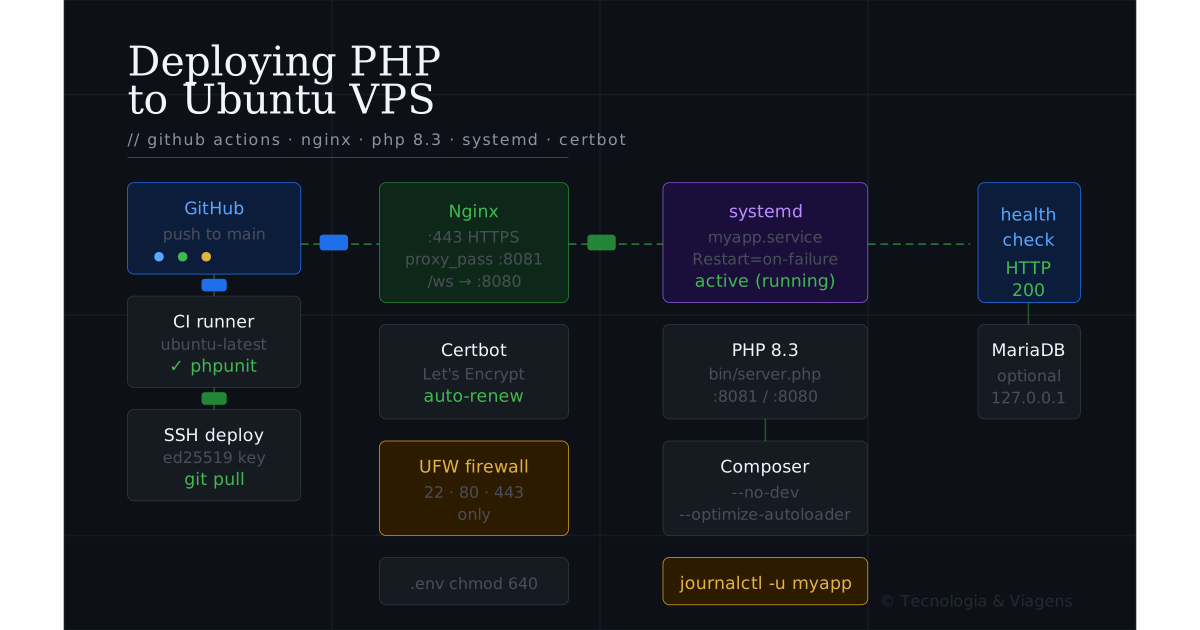
A step-by-step guide for deploying a long-running PHP application (with optional WebSocket support) to an Ubuntu VPS, using GitHub Actions for CI/CD.
Based on: the logstream-server deployment on an OCI Ubuntu VPS.
Tested on: Ubuntu 22.04 / 24.04 (LTS), PHP 8.3, Nginx, Certbot.
1. Prerequisites
On your local machine / GitHub:
- Repository hosted on GitHub
- GitHub Actions enabled
- The following GitHub Secrets created (Settings → Secrets → Actions):
| Secret | Description |
|---|---|
SSH_HOST |
Server IP or hostname |
SSH_USER |
Deploy user (e.g. deploy) |
SSH_PORT |
SSH port (usually 22) |
SSH_PRIVATE_KEY |
Private SSH key for the deploy user |
HEALTH_CHECK_URL |
Full URL to your app’s health endpoint |
Add additional secrets for anything app-specific (database passwords, API tokens, etc.).
2. Server preparation
SSH into your server as root (or a sudoer):
ssh root@your-server-ip
Update the system:
apt update && apt upgrade -y
apt install -y curl wget git unzip software-properties-common \
               nginx certbot python3-certbot-nginx ufw
3. Install PHP and extensions
Add the Ondřej PPA for up-to-date PHP packages:
add-apt-repository ppa:ondrej/php -y
apt update
Install PHP 8.3 and the extensions your app needs:
# Core (always needed)
apt install -y php8.3-cli php8.3-mbstring php8.3-xml php8.3-curl php8.3-zip

# Optional — pick what your app uses
apt install -y php8.3-mysql     # MariaDB / MySQL
apt install -y php8.3-sockets   # ReactPHP / long-running processes
apt install -y php8.3-pcntl     # Process control (signal handling)
apt install -y php8.3-redis     # Redis
apt install -y php8.3-gd        # Image processing
Install Composer globally:
curl -sS https://getcomposer.org/installer | php
mv composer.phar /usr/local/bin/composer
chmod +x /usr/local/bin/composer
Verify:
php8.3 --version
composer --version
4. Create the application user and directory
Using a dedicated system user means the app never runs as root and file permissions stay clean.
# Replace 'myapp' with your application name throughout
APP=myapp

# Create system user (no login shell, no home directory)
useradd --system --no-create-home --shell /usr/sbin/nologin $APP

# Create the application directory
mkdir -p /opt/$APP
chown $APP:$APP /opt/$APP
chmod 750 /opt/$APP
Create a deploy user that GitHub Actions will SSH in as:
useradd --system --create-home --shell /bin/bash deploy
Grant the deploy user ownership of the app directory so it can git pull and run Composer:
chown -R deploy:deploy /opt/$APP
5. Deploy SSH key and sudoers
SSH key
On your local machine, generate a dedicated deploy key:
ssh-keygen -t ed25519 -C "github-actions-deploy" -f ~/.ssh/deploy_myapp -N ""
Copy the public key to the server:
ssh-copy-id -i ~/.ssh/deploy_myapp.pub deploy@your-server-ip
⚠️ if ssh-copy-id fails
Cloud providers (OCI, AWS, Azure) typically provision VMs with a defaultubuntu user and password authentication disabled, so ssh-copy-id targeting the deploy user may fail before that user exists or has SSH configured. Log in as ubuntu (or via the provider's web console) and use the manual steps below instead.
Or manually append it:
# On the server
mkdir -p /home/deploy/.ssh
echo "YOUR_PUBLIC_KEY_HERE" >> /home/deploy/.ssh/authorized_keys
chmod 700 /home/deploy/.ssh
chmod 600 /home/deploy/.ssh/authorized_keys
chown -R deploy:deploy /home/deploy/.ssh
Add the private key (~/.ssh/deploy_myapp) as the SSH_PRIVATE_KEY GitHub Secret.
Sudoers — allow deploy to restart the service without a password
cat > /etc/sudoers.d/$APP-deploy << EOF
deploy ALL=(ALL) NOPASSWD: /usr/bin/systemctl restart $APP
deploy ALL=(ALL) NOPASSWD: /usr/bin/systemctl start $APP
deploy ALL=(ALL) NOPASSWD: /usr/bin/systemctl stop $APP
deploy ALL=(ALL) NOPASSWD: /usr/bin/systemctl status $APP
EOF

chmod 440 /etc/sudoers.d/$APP-deploy
Verify the file is valid:
visudo -c -f /etc/sudoers.d/$APP-deploy
6. Clone the repository and install dependencies
As the deploy user:
su - deploy

git clone git@github.com:your-org/your-repo.git /opt/$APP
cd /opt/$APP

# Install production dependencies (no dev packages)
composer install --no-dev --optimize-autoloader
If your repo is private, add the deploy key as a GitHub Deploy Key (Settings → Deploy keys → Add) using the same public key, with read-only access.
7. Environment configuration
Create the .env file (never commit this to the repository):
cp /opt/$APP/.env.example /opt/$APP/.env
nano /opt/$APP/.env
Typical contents for a PHP app:
APP_ENV=production
APP_DEBUG=false

# HTTP
HTTP_PORT=8081

# Secrets
APP_SECRET=change-me-to-a-strong-random-value

# Database (if used)
DB_HOST=127.0.0.1
DB_PORT=3306
DB_NAME=myapp
DB_USER=myapp
DB_PASS=change-me
Lock down permissions:
chown $APP:$APP /opt/$APP/.env
chmod 640 /opt/$APP/.env
8. Systemd service
Systemd keeps your PHP process alive, starts it on boot, and restarts it on failure.
cat > /etc/systemd/system/$APP.service << EOF
[Unit]
Description=My PHP Application
After=network.target
# If your app needs the database, add:
# After=network.target mariadb.service

[Service]
Type=simple
User=$APP
Group=$APP
WorkingDirectory=/opt/$APP
ExecStart=/usr/bin/php8.3 bin/server.php
Restart=on-failure
RestartSec=5s

# Environment file (loaded before the process starts)
EnvironmentFile=/opt/$APP/.env

# Logging — output goes to journald
StandardOutput=journal
StandardError=journal
SyslogIdentifier=$APP

# ── Security hardening ─────────────────────────────────────────────────────
# Comment these out if running inside an LXC container (OCI VMs are usually LXC)
# ProtectSystem=strict
# PrivateTmp=true
# NoNewPrivileges=true

[Install]
WantedBy=multi-user.target
EOF
Enable and start the service:
systemctl daemon-reload
systemctl enable $APP
systemctl start $APP
systemctl status $APP
Watch live logs:
journalctl -u $APP -f
9. Nginx site
cat > /etc/nginx/sites-available/$APP << EOF
server {
    listen 80;
    server_name your-domain.com;

    # Redirect HTTP → HTTPS (Certbot will manage this automatically)
    return 301 https://\$host\$request_uri;
}

server {
    listen 443 ssl;
    server_name your-domain.com;

    # SSL certificates (Certbot will fill these in)
    ssl_certificate     /etc/letsencrypt/live/your-domain.com/fullchain.pem;
    ssl_certificate_key /etc/letsencrypt/live/your-domain.com/privkey.pem;
    include             /etc/letsencrypt/options-ssl-nginx.conf;
    ssl_dhparam         /etc/letsencrypt/ssl-dhparams.pem;

    # Security headers
    add_header Strict-Transport-Security "max-age=63072000; includeSubDomains" always;
    add_header X-Content-Type-Options    "nosniff"                             always;
    add_header X-Frame-Options           "SAMEORIGIN"                          always;
    add_header Referrer-Policy           "strict-origin-when-cross-origin"     always;

    # Proxy all requests to PHP
    location / {
        proxy_pass         http://127.0.0.1:8081;
        proxy_http_version 1.1;
        proxy_set_header   Host              \$host;
        proxy_set_header   X-Real-IP         \$remote_addr;
        proxy_set_header   X-Forwarded-For   \$proxy_add_x_forwarded_for;
        proxy_set_header   X-Forwarded-Proto \$scheme;
        proxy_read_timeout 60s;
    }
}
EOF
Enable the site:
ln -s /etc/nginx/sites-available/$APP /etc/nginx/sites-enabled/
nginx -t
systemctl reload nginx
10. SSL with Certbot
Make sure your domain’s DNS A record already points to the server’s public IP before running Certbot.
certbot --nginx -d your-domain.com
Certbot will: verify domain ownership over HTTP, obtain a Let’s Encrypt certificate, automatically update your Nginx config with SSL settings, and install a cron/systemd timer for auto-renewal.
Test renewal:
certbot renew --dry-run
11. GitHub Actions workflows
ci.yml — runs on every pull request
{% raw %}
# .github/workflows/ci.yml
name: CI

on:
  pull_request:
  workflow_dispatch:

jobs:
  test:
    runs-on: ubuntu-latest

    steps:
      - name: Checkout
        uses: actions/checkout@v4
        with:
          fetch-depth: 0

      - name: Cache Composer dependencies
        uses: actions/cache@v4
        with:
          path: /tmp/composer-cache
          key: ${{ runner.os }}-${{ hashFiles('**/composer.lock') }}

      - name: Install dependencies
        uses: php-actions/composer@v6

      - name: PHPUnit tests
        uses: php-actions/phpunit@v4
        with:
          version: 11
          php_version: "8.3"
          php_extensions: xdebug curl mbstring
          configuration: phpunit.xml
          args: --coverage-filter src tests
        env:
          XDEBUG_MODE: coverage
{% endraw %}
release.yml — runs on push to main, deploys to the server
{% raw %}
# .github/workflows/release.yml
name: Release

on:
  push:
    branches: [main]
  workflow_dispatch:

jobs:
  test:
    runs-on: ubuntu-latest
    steps:
      - uses: actions/checkout@v4
      - uses: php-actions/composer@v6
      - uses: php-actions/phpunit@v4
        with:
          version: 11
          php_version: "8.3"
          configuration: phpunit.xml

  deploy:
    needs: test
    runs-on: ubuntu-latest

    steps:
      - name: Checkout
        uses: actions/checkout@v4

      - name: Set up SSH
        run: |
          mkdir -p ~/.ssh
          echo "${{ secrets.SSH_PRIVATE_KEY }}" > ~/.ssh/id_ed25519
          chmod 600 ~/.ssh/id_ed25519
          ssh-keyscan -p ${{ secrets.SSH_PORT }} ${{ secrets.SSH_HOST }} >> ~/.ssh/known_hosts

      - name: Deploy
        run: |
          ssh -p ${{ secrets.SSH_PORT }} \
              ${{ secrets.SSH_USER }}@${{ secrets.SSH_HOST }} << 'REMOTE'
            set -e
            cd /opt/myapp

            echo "→ Pulling latest code"
            git pull origin main

            echo "→ Installing dependencies"
            composer install --no-dev --optimize-autoloader --no-interaction

            echo "→ Restarting service"
            sudo systemctl restart myapp

            echo "→ Waiting for service to come up"
            sleep 3
          REMOTE

      - name: Health check
        run: |
          STATUS=$(curl -s -o /dev/null -w "%{http_code}" \
                   --retry 5 --retry-delay 3 \
                   "${{ secrets.HEALTH_CHECK_URL }}")
          if [ "$STATUS" != "200" ]; then
            echo "Health check failed — HTTP $STATUS"
            exit 1
          fi
          echo "Health check passed — HTTP $STATUS"
{% endraw %}
12. Optional: WebSocket support
If your application runs a WebSocket server on a separate port (e.g. 8080), add a second proxy block to Nginx.
Nginx — add inside the server { listen 443 ssl; ... } block
# WebSocket upgrade proxy
location /ws {
    proxy_pass          http://127.0.0.1:8080;
    proxy_http_version  1.1;

    # Required for WebSocket upgrade
    proxy_set_header    Upgrade    $http_upgrade;
    proxy_set_header    Connection "upgrade";
    proxy_set_header    Host       $host;

    # Keep connections alive long enough for real-time use
    proxy_read_timeout  3600s;
    proxy_send_timeout  3600s;
}
Systemd — the same service handles both ports
Your PHP process listens on both ports internally. No second service is needed.
Firewall — WebSocket traffic goes through Nginx (443), not directly
Do not open port 8080 on the firewall. Clients connect to wss://your-domain.com/ws which Nginx proxies to the internal port. Keep port 8080 closed externally.
13. Optional: MariaDB
Install and secure MariaDB:
apt install -y mariadb-server
mysql_secure_installation
Create a database and dedicated user for the app:
mysql -u root -p << SQL
CREATE DATABASE myapp CHARACTER SET utf8mb4 COLLATE utf8mb4_unicode_ci;
CREATE USER 'myapp'@'127.0.0.1' IDENTIFIED BY 'strong-password-here';
GRANT ALL PRIVILEGES ON myapp.* TO 'myapp'@'127.0.0.1';
FLUSH PRIVILEGES;
SQL
Run any migration scripts:
mysql -u myapp -p myapp < /opt/$APP/migrations/001_schema.sql
Running migrations in GitHub Actions (via WireGuard VPN)
If the database is not directly reachable from GitHub Actions (it shouldn’t be), use WireGuard.
Add these secrets: WIREGUARD_CONFIG, MYSQL_SERVER, MYSQL_USER_MIGRATION, MYSQL_PASSWORD_MIGRATION, MYSQL_DATABASE.
Add this job to release.yml:
{% raw %}
  migrate:
    needs: deploy
    runs-on: ubuntu-latest
    if: contains(join(github.event.commits.*.modified, ','), 'migrations/')

    steps:
      - uses: actions/checkout@v4

      - name: Install WireGuard
        run: sudo apt-get install -y wireguard

      - name: Connect VPN
        run: |
          echo "${{ secrets.WIREGUARD_CONFIG }}" | sudo tee /etc/wireguard/wg0.conf
          sudo wg-quick up wg0

      - name: Run pending migrations
        run: |
          for f in migrations/*.sql; do
            echo "Running $f..."
            mysql -h ${{ secrets.MYSQL_SERVER }} \
                  -u ${{ secrets.MYSQL_USER_MIGRATION }} \
                  -p${{ secrets.MYSQL_PASSWORD_MIGRATION }} \
                  ${{ secrets.MYSQL_DATABASE }} < "$f"
          done

      - name: Disconnect VPN
        if: always()
        run: sudo wg-quick down wg0
{% endraw %}
14. Firewall rules
# Allow SSH, HTTP, HTTPS — nothing else
ufw allow OpenSSH
ufw allow 'Nginx Full'
ufw enable
ufw status verbose
Internal ports (8081 for HTTP, 8080 for WebSocket) are not opened — they are only reachable via Nginx on the same machine.
If the server is behind an OCI/cloud security list, mirror these rules there too: Ingress TCP 22 (SSH), Ingress TCP 80 (HTTP → redirect to HTTPS), Ingress TCP 443 (HTTPS + WSS).
15. Post-deployment checklist
- DNS A record for domain points to the correct server IP
systemctl status myappshowsactive (running)curl -s https://your-domain.com/healthreturns HTTP 200certbot renew --dry-runsucceeds without errorsnginx -tpasses with no warnings- Firewall allows only ports 22, 80, 443 (
ufw status) .envfile haschmod 640and is owned by the app user, not world-readablecomposer.jsondoes not include dev-only packages in production (--no-dev)- GitHub Actions CI badge is green on
main - First deploy ran successfully from GitHub Actions (not just from the server directly)
Cheat sheet — common commands
# Tail live application logs
journalctl -u myapp -f

# Restart the service
sudo systemctl restart myapp

# Reload Nginx without downtime (config changes only)
sudo systemctl reload nginx

# View Nginx error log
tail -f /var/log/nginx/error.log

# Check which process is using a port
ss -tlnp | grep 8081

# Test Nginx config before reloading
nginx -t

# Force-renew SSL certificate
certbot renew --force-renewal --nginx -d your-domain.com

# Check SSL expiry
echo | openssl s_client -connect your-domain.com:443 2>/dev/null \
    | openssl x509 -noout -dates
Variables reference
Replace every occurrence of these placeholders with your real values:
| Placeholder | Example | Meaning |
|---|---|---|
myapp |
logstream |
App slug — used for user, directory, and service names |
your-domain.com |
sub.domain.com |
The domain pointing to this server |
your-server-ip |
152.67.xx.xx |
Server public IP |
your-org/your-repo |
guibranco/logstream-server |
GitHub repository |
8081 |
8081 |
Internal HTTP port your PHP app listens on |
8080 |
8080 |
Internal WebSocket port (omit section if not used) |
bin/server.php |
bin/server.php |
Entry point script to start your app |
Categories