A Map of My Infrastructure: How I Run a Dozen Side Projects on a Budget
A walkthrough of the small, multi-provider estate that keeps my portfolio, bots, and APIs running — five hosting surfaces, a decoupled webhook pipeline, a VPN-gated database and two monitoring layers.
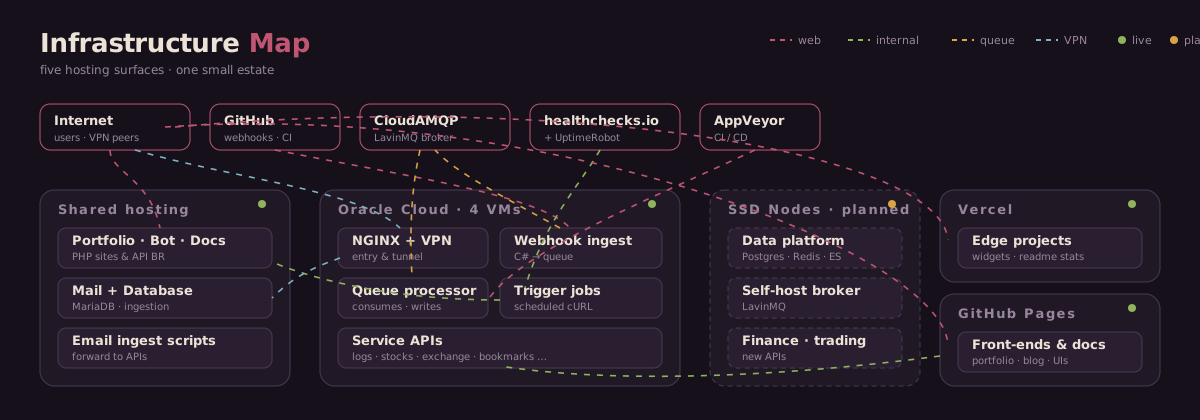
I maintain a growing collection of side projects — a chat-style bot, a handful of small APIs, a couple of dashboards, and the odd legacy site I can't quite bring myself to retire. Over time these have spread across several hosting providers, and I recently sat down to draw the whole thing out. This post is a tour of that map: what runs where, and why.
The map is organized by provider, and within each provider by server. On every server the ordering is deliberate: anything that isn’t a web service — a background daemon, a scheduled script, a VPN — sits at the top, then the reverse proxy, then the HTTP APIs below it. Once you know that rule, you can read any box top-to-bottom and immediately tell what’s exposed to the web and what isn’t.
Five places to run things
The estate spans five hosting surfaces, each chosen for what it’s genuinely good at rather than out of loyalty to any one vendor.
Webhook processing, decoupled
When something happens on GitHub, the delivery lands on a C# ingestion service on one of the VMs. That service does almost nothing except validate the payload and drop it onto a message queue hosted on CloudAMQP (their free tier runs a LavinMQ broker — I actually have several instances spread across regions). A separate processor on a different VM consumes from the queue and writes the result to the database.
Email as an ingestion channel
A neat trick I lean on: some services are fed by email. A message arrives at the shared host’s mail server, a small PHP script picks it up and forwards it over HTTP to the relevant API on a VM. It lets the shared host do what it’s uniquely good at — receiving mail — while the real application logic lives in a proper API I control.
Two of my newer services ingest their data exactly this way. The shared host becomes a lightweight gateway; the VM does the actual work.
A private tunnel to the database
The database never accepts connections from the open internet. Instead, a WireGuard VPN (via PiVPN) runs on one of the OCI VMs, and anything that needs database access — including GitHub Actions CI pipelines — joins the tunnel and reaches the database through an encrypted connection. Ephemeral CI runners spin up, connect to the VPN, do their work, and vanish. The database’s attack surface stays effectively zero.
CI/CD from two directions
Continuous integration runs through both GitHub Actions and AppVeyor — the latter as a complementary pipeline that still notifies one of my legacy webhook handlers when builds complete. Belt and braces.
| Pipeline | Role | Triggers |
|---|---|---|
| GitHub Actions | Primary CI/CD, database migrations, deployment | Push, PR, schedule, workflow_dispatch |
| AppVeyor | Complementary build validation (legacy .NET Framework) | Push — notifies webhook handler on build complete |
Keeping an eye on all of it
With this many moving parts across this many providers, monitoring isn’t optional. Two external services watch the estate from opposite directions:
On top of that, a home-grown Projects Monitor service watches everything internally — it has a connection to every other service on the map, which is why, in the diagram, it’s the box with threads running to absolutely everything.
Why bother mapping it?
Two reasons. First, drawing it forced me to notice things I'd lost track of — a legacy endpoint still receiving traffic, a service quietly depending on a broker on another continent, a box carrying more than its share of RAM. Second, the map now doubles as a launchpad: every provider, control panel and monitoring dashboard is one click away from the same diagram.
The estate keeps growing, and the map grows with it. If there's interest, I'll write a follow-up on the specific tooling that keeps it maintainable — the config-driven diagram itself, the healthcheck patterns, and how I keep a dozen deployments from becoming a dozen headaches.
Categories