Feature Flags vs. A/B Testing: Same Switch, Different Questions
A feature flag decides who gets a code path. An A/B test measures whether it was worth it. How each works under the hood — hashing, targeting, allocation, telemetry, statistics — and how one variant flag becomes a percentage rollout, a beta allow-list, or a real experiment.
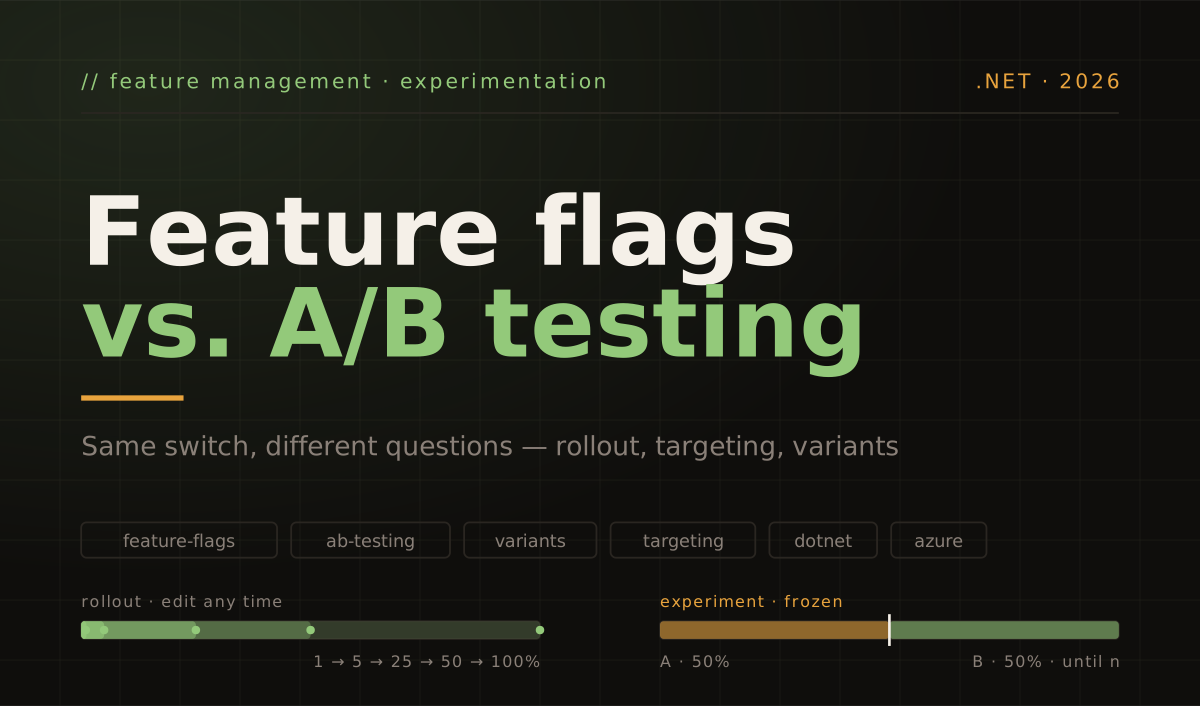
Feature flags and A/B tests get lumped together because they share the same mechanical primitive: an if whose answer comes from outside the code, and a way to split users across its branches. That is where the similarity ends. A flag is a delivery control — it answers "who gets this code path, and when?". An A/B test is a measurement instrument — it answers "is B better than A, by how much, and how sure are we?". Confusing the two produces the most common failure I see in teams adopting either: a percentage rollout that someone reads as an experiment, or an experiment that someone edits like a rollout.
This post goes through how each one works in practice — the evaluation pipeline of a flag, the statistics behind a test — and then through the place where they meet: a single flag that is enabled for a percentage of the audience, for a hand-picked list of users, or split into variants the way an A/B test would split them. The code is .NET, because that is what I write, but the mechanics are the same in every tool.
Same if, different question
Strip both ideas down and this is the whole shared surface:
if (await featureManager.IsEnabledAsync("NewCheckout"))
{
    return await _newCheckout.RunAsync(cart);
}

return await _legacyCheckout.RunAsync(cart);
What differs is the direction of the decision.
With a feature flag, the decision is the output. Somebody — a release manager, an on-call engineer, a rule in a config store — decides that the new checkout is on for internal users, or for 10% of traffic, or for everyone except one problematic tenant, and the flag enforces that decision at runtime. Nothing is being measured; something is being controlled. The flag’s success criterion is operational: did we ship without breaking production, and could we turn it off in seconds if we had to?
With an A/B test, the decision is the input. You commit up front to a hypothesis (“the new checkout will raise order completion”), a primary metric, a randomization unit, a sample size, and a fixed split. The split is frozen for the duration, users are assigned at random, their exposure is logged, and at the end a statistical test tells you whether the difference you see is larger than what noise would produce. The experiment’s success criterion is epistemic: do we now know something we did not know before?
Pete Hodgson’s taxonomy on martinfowler.com makes the same cut from a different angle. He classifies toggles along two dimensions — longevity (how long the toggle lives) and dynamism (how dynamic the toggling decision must be) — and lands on four categories: release toggles, experiment toggles, ops toggles and permissioning toggles. “Experiment toggle” is one of the four, and the article is explicit that it must “remain in place with the same configuration long enough to generate statistically significant results” and that it is “highly dynamic”, because consecutive requests may come from different users and go different ways. The experiment is a use of a toggle, with constraints the other three uses do not have.
A feature flag, in practice
A flag has five moving parts, and the interesting engineering lives in the third one.
- A definition — a name, an enabled bit, and zero or more rules (filters, strategies, conditions, depending on the vendor’s vocabulary).
- An evaluation context — who is asking: user id, groups or roles, tenant, region, app version, anything the rules may want to look at.
- An evaluator — takes definition + context and returns a boolean (or, for variant flags, a variant name). This is the piece that decides whether “10%” means the same 10% on every request.
- A toggle point — the
ifin your code. Hodgson’s advice is to keep this dumb and move the logic into a single router, so the decision has one home. - A configuration source —
appsettings.json, a database row, Azure App Configuration, LaunchDarkly, Unleash, a Redis key. What matters is that it changes without a deploy; that is the whole point.
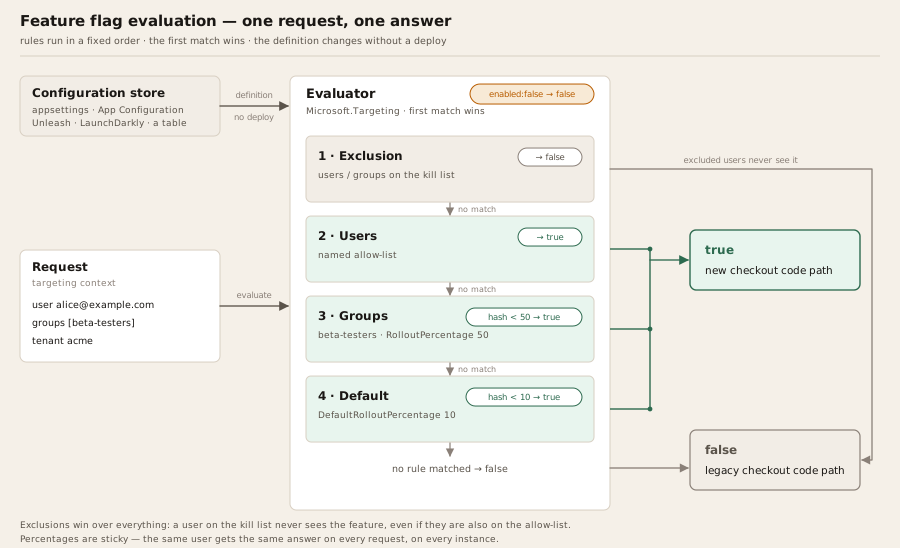
In .NET the reference implementation is Microsoft.FeatureManagement (version 4.8 at the time of writing). Its definition schema ships three built-in filters — Microsoft.Percentage, Microsoft.TimeWindow and Microsoft.Targeting — and the targeting one is the shape you will actually use, because it combines the three audiences the title of this post asks about:
{
  "feature_management": {
    "feature_flags": [
      {
        "id": "NewCheckout",
        "enabled": true,
        "conditions": {
          "client_filters": [
            {
              "name": "Microsoft.Targeting",
              "parameters": {
                "Audience": {
                  "Users": ["alice@example.com", "bob@example.com"],
                  "Groups": [
                    { "Name": "internal",     "RolloutPercentage": 100 },
                    { "Name": "beta-testers", "RolloutPercentage": 50 }
                  ],
                  "DefaultRolloutPercentage": 10,
                  "Exclusion": {
                    "Users":  ["carol@example.com"],
                    "Groups": ["tenant-acme"]
                  }
                }
              }
            }
          ]
        }
      }
    ]
  }
}
The order of evaluation is fixed and worth memorising, because it is the same order in almost every tool: exclusions win over everything, then named users, then group percentages, then the default percentage. One detail trips people up: the group percentage is a first chance, not a cap. A beta-tester who misses the group’s 50% is still evaluated against the 10% default, so the feature reaches about 55% of that group, not 50%. The wiring is three lines, plus an accessor that tells the library who the current user is — and the accessor is where most real-world flag bugs live, so it is worth reading slowly:
builder.Services.AddHttpContextAccessor();
builder.Services
    .AddFeatureManagement()
    .WithTargeting<HttpTargetingContextAccessor>();

public sealed class HttpTargetingContextAccessor(IHttpContextAccessor http)
    : ITargetingContextAccessor
{
    private const string AnonymousPrefix = "anon:";

    public ValueTask<TargetingContext> GetContextAsync()
    {
        var ctx  = http.HttpContext;
        var user = ctx?.User;

        // Use the same identifier the flag definitions use — e-mails here. Read it
        // through the mapped claim type: with JwtBearer's default inbound mapping a
        // raw FindFirst("sub") returns null, and a null id puts everyone in one bucket.
        string? id = user?.FindFirst(ClaimTypes.Email)?.Value;

        // Logged-out visitors get a stable id of their own, in a namespace of its own:
        // "anon:<guid>" can never collide with an allow-listed e-mail, however the
        // cookie was forged. Middleware issues the cookie; this only reads it.
        id ??= AnonymousId(ctx);

        return ValueTask.FromResult(new TargetingContext
        {
            UserId = id,
            Groups = user?.FindAll("groups")
                          .Select(c => c.Value)
                          .ToList() ?? []
        });
    }

    private static string AnonymousId(HttpContext? ctx)
    {
        if (ctx is null)
        {
            return AnonymousPrefix + Guid.NewGuid().ToString("N");
        }

        // Fixed once per request, so every evaluation and every exposure event in
        // this request sees the same id even before the cookie round-trips.
        if (ctx.Items["targeting-id"] is string cached)
        {
            return cached;
        }

        var cookie = ctx.Request.Cookies["visitor-id"];
        var guid   = Guid.TryParse(cookie, out var parsed) ? parsed : Guid.NewGuid();
        var anon   = AnonymousPrefix + guid.ToString("N");

        ctx.Items["targeting-id"] = anon;
        return anon;
    }
}
Four things in that accessor are deliberate. IHttpContextAccessor is not registered by default, so AddHttpContextAccessor() has to be there or the container cannot build the accessor. The identifier has to be the one the flag definitions use — the targeting rules above list e-mail addresses, so the accessor reads the e-mail claim through its mapped ClaimTypes name, because ASP.NET Core’s JWT bearer handler renames sub and email on the way in and a raw lookup silently returns null. A visitor without an identity still needs a distinct one: with a null or constant UserId every logged-out request hashes to the same bucket, so a “10%” rollout is either 0% or 100% for all of them. And that anonymous id lives in its own namespace and is validated before use — a cookie is client-controlled, and an accessor that passed its raw value through would let anyone become alice@example.com by editing a cookie. The id is also fixed once per request, so repeated evaluations and the exposure events they emit agree with each other; the cookie that middleware writes back is what makes it agree across requests.
How “10%” stays the same 10%
This is the part that most people never look at, and it decides whether a rollout is sticky. A naive implementation calls Random.Shared.NextDouble() < 0.10 on every request, which means the same user sees the new checkout on one page load and the old one on the next. Every serious library instead derives the decision from a hash of the user plus the flag. In Microsoft.FeatureManagement the context id is literally $"{userId}\n{featureName}" (with the group name appended for group rollouts), hashed with SHA-256; the first four bytes become an unsigned integer, divided by uint.MaxValue and multiplied by 100 to land on a number between 0 and 100, which is then compared with the rollout percentage. Unleash does the same job with 32-bit MurmurHash3 over a stickiness value (user id, session id, or random) plus a groupId that defaults to the flag name, normalised to 1–100.
Two properties fall out of this and both matter later:
- Determinism. The same user gets the same answer on every request, on every instance, with no shared state. Raising the percentage from 10 to 25 keeps the original 10% in and adds 15% on top; it does not reshuffle.
- Independence between flags. Because the flag name is part of the hash input, a user who falls in the first 10% of
NewCheckouthas no particular tendency to fall in the first 10% ofNewSearch. If you want correlation — the same cohort across several flags — both libraries let you override the hash input (aseedin Microsoft’s allocation schema,groupIdin Unleash).
The lifecycle nobody budgets for
A flag is born, ships dark, is enabled ring by ring, reaches 100%, and then — this is the step that gets skipped — is deleted, along with the old code path. Hodgson calls toggles “inventory” with a “carrying cost” and suggests release toggles “should generally not stick around much longer than a week or two”. The inventory metaphor is right. Each live flag doubles the number of states the system can be in, and flags that outlive their purpose are the raw material for the most expensive flag incident on record.
At my current employer, the most common reason a flag gets created has nothing to do with risk. A feature is finished but cannot go live yet: it only makes sense delivered together with other pieces that are still in progress, or the people who will use it have not been trained on it. Without a flag, the choices are to hold the merge — which stops the CI/CD flow and turns the eventual release into a bundle — or to prioritise selectively, pulling only the tasks that happen to be safe to ship in the "right" order and leaving the rest waiting.
With a flag, the code merges and deploys the moment it is ready, dark. The pipeline never stops, the team keeps pulling the next task instead of queuing behind the slowest dependency, and when the training happens or the last piece lands, the switch is flipped — no deploy, no release day. Two things followed from that. We need far fewer hot fixes, because what reaches production is a series of small, reviewed increments that have been deployed for days before anyone sees them, rather than a large merge done in a hurry. And the backlog flows on its own merit: we stopped doing the selective prioritisation whose only purpose was to keep unfinished combinations away from production.
An A/B test, in practice
An A/B test is an online controlled experiment. The word that carries the weight is controlled: the only systematic difference between the two groups is the treatment, so whatever difference shows up in the metric can be attributed to it. Getting there needs more structure than a flag does.
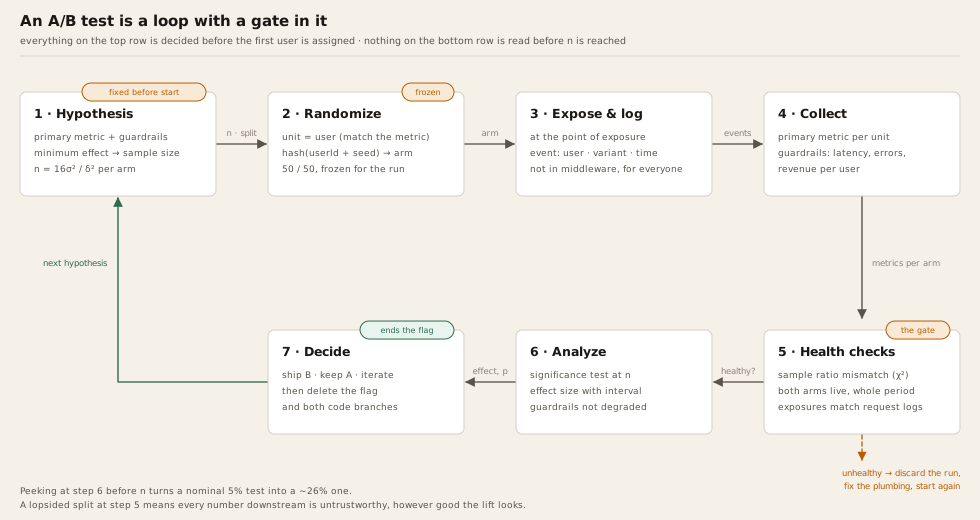
- Hypothesis and primary metric. “Showing the delivery estimate on the product page will increase add-to-cart rate.” One primary metric, decided before the test starts, plus a small set of guardrail metrics (latency, error rate, revenue per user) that the treatment must not degrade.
- Randomization unit. Usually the user; sometimes the session, device, or account. The unit must match the metric: a per-user conversion metric with per-session randomization gives one user both experiences and poisons the comparison.
- Assignment. Deterministic hashing again — the same mechanism as a flag — but with the split frozen. A 50/50 allocation stays 50/50 until the test ends.
- Exposure logging. An event that says “user u was assigned to variant v at time t”. Without it you cannot compute anything; with it logged too early (at evaluation, for users who never reach the feature) the effect is diluted by people who were assigned but never treated.
- Sample size, fixed in advance. Computed from the baseline rate, the minimum effect worth detecting, and the usual 5% significance / 80% power conventions.
- Analysis and decision. A statistical test on the primary metric, a check on the guardrails, a check that the experiment itself was healthy, and only then a ship/no-ship call.
Why bother? Because intuition loses most of the time
The reason to put up with all that structure is empirical. Kohavi and Thomke’s 2017 piece in the Harvard Business Review reports that, at Microsoft, roughly one-third of tested ideas prove effective, one-third are neutral and one-third are negative, and that at Google and Bing “only about 10% to 20% of experiments generate positive results”. Their opening anecdote is the point of the whole discipline: a Bing engineer’s small change to how ad headlines were displayed sat in the backlog “for more than six months” because nobody thought it mattered, and when it was finally tested it “increased revenue by an astonishing 12%” — more than $100 million a year in the United States alone. Nobody ranked it; the experiment did.
The two ways a test lies to you
Peeking. If you watch the dashboard and stop the moment the p-value dips under 0.05, you are not running a 5% test. Evan Miller’s worked example — stopping as soon as significance appears or after 150 observations — pushes the real false-positive rate to 26.1%, “more than five times what you probably thought the significance level was”. His rule of thumb is that peeking ten times turns a nominal 1% into an actual 5%. The fix is boring: compute the sample size first, run until you reach it, and only then look — or use a sequential method designed for interim checks. His back-of-the-envelope formula for the size is n = 16σ²/δ² per variant, where δ is the smallest effect you care about and σ² = p(1 − p) for a conversion rate.
Sample ratio mismatch. You configured 50/50 and the counts came in at 50,500 versus 49,500. That looks close; it is not. A chi-squared goodness-of-fit test on those two numbers gives χ² = 10 and p ≈ 0.0016: a split that lopsided happens by chance about once in six hundred experiments, so something else is going on — a redirect that drops slow clients from one arm, a bot filter that hits one variant harder, a caching layer that re-assigns, an exposure event firing twice. Fabijan, Vermeer and colleagues built a whole taxonomy of these causes from experience across more than 25 products (KDD 2019), and their conclusion is blunt: ignoring an SRM “may result in a bad product modification appearing to be good”. Any metric computed on an experiment with an SRM is untrustworthy, however pretty the lift looks.
Side by side
| Feature flag | A/B test | |
|---|---|---|
| Question it answers | Who gets this code path, and when? | Is B better than A, by how much, how confidently? |
| Output | A boolean (or a variant) per request | An estimate of effect with an uncertainty, and a decision |
| Who decides the split | A person, whenever they like | The protocol, before the test starts |
| Can the split change mid-flight? | ✓ That is the point | ✗ Changing it breaks the comparison |
| Assignment | Rules, allow-lists, hashed percentages | Hashed random assignment, frozen |
| Needs exposure logging | ~ Nice for audit | ✓ Mandatory |
| Needs statistics | ✗ | ✓ Sample size, significance, SRM |
| Metrics watched | Operational: errors, latency, saturation | Product: conversion, retention, revenue + guardrails |
| Natural end | 100% and the flag is deleted | Sample reached, decision made, flag deleted |
| Typical owner | Engineering / release | Product + data, with engineering |
| Failure mode | Stale flags, divergent fleets, config drift | Peeking, SRM, wrong unit, underpowered tests |
| Can exist without the other | ✓ | ✗ It needs a switch to split on |
Where they meet: one flag, three audiences
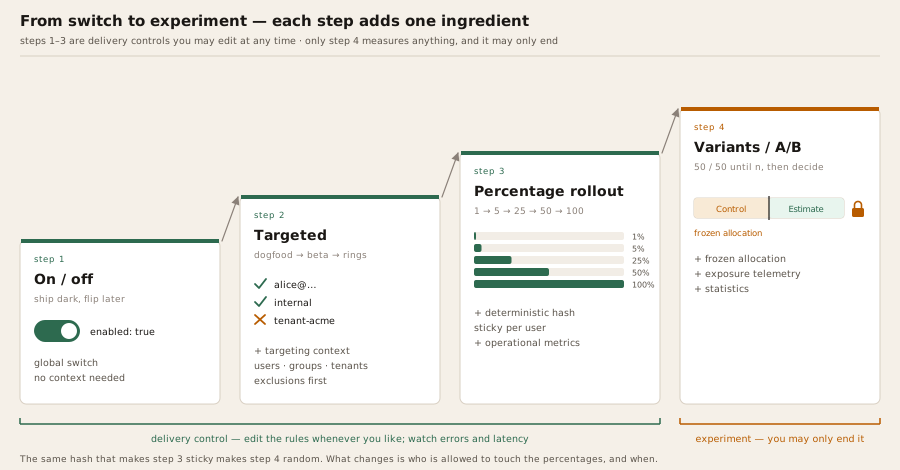
The thing that makes the two concepts blur is that modern flag systems let you drive the same flag three ways, and the third way is an A/B test’s assignment mechanism. Think of it as a ladder: each rung adds one ingredient, and only the top rung is an experiment.
Audience 1 — a percentage of everyone (progressive delivery)
This is DefaultRolloutPercentage above, or Unleash’s gradual rollout, or a canary by user rather than by server. You go 1% → 5% → 25% → 50% → 100% over days, watching error rates, p99 latency, queue depth and support tickets at each step. The hash keeps each user on one side, so the first 1% keep the feature as you ramp.
What a percentage rollout is not is an experiment, and this is the single most common confusion. Two reasons:
- The population under treatment changes in time and in composition. Because the hash is sticky, the 50% you watch the following Monday contains Tuesday’s 5% plus 45% who are new to the feature — observed in a different week, with a marketing campaign and a release in between. Comparing the two conversion rates compares calendars and cohorts, not code.
- Nobody fixed a sample size or a metric in advance. The numbers on the dashboard during a ramp are a smoke detector for operational breakage, not evidence of product value. Treat them as such.
Audience 2 — specific users and groups
Users, Groups and Exclusion: internal employees first (dogfooding), then a beta-tester group at 50%, then everyone; or a single enterprise tenant that asked for the feature; or everyone except the tenant whose integration you know will break. Rings — Ring0 internal, Ring1 early adopters, Ring2 general — are just this with naming discipline. Exclusions evaluate first, so a kill list always beats an allow list.
The clearest case of this audience I have been through was the introduction of a new payment gateway at my current employer. The hard part was not our code. It was a new external environment, run by a third party, that we did not control and could only really exercise with real users and real customers — and switching the whole operation over on day one was not an option.
So the integration shipped behind a selective flag: an allow-list of users. For those users, payments went through the new gateway; for everyone else nothing changed, and the old gateway kept doing its job. The first real transactions exposed problems in the configuration of our account on the provider's side — the kind of thing no sandbox had shown. We opened tickets with their support, they fixed the setup, and we retried in production from our side, without a deploy, while the impact stayed contained to one or two customers instead of the entire operation. The flag did not make the integration correct; it made finding out that it was not correct cheap.
This is pure delivery control. It is also where permissioning sneaks in: a flag that is “on for premium customers” is no longer a release mechanism but a product entitlement, and Hodgson’s point about longevity applies — entitlements live for years and deserve to be modelled as entitlements, not left in the flag inventory as if they were going to be removed next sprint.
Audience 3 — variants, allocated like an experiment
The top rung. Instead of a boolean, the flag has named variants, each with its own configuration value, and an allocation that assigns users to variants by percentile range, with user and group overrides on top and a seed that fixes the hash input. In Microsoft.FeatureManagement’s schema:
{
  "feature_management": {
    "feature_flags": [
      {
        "id": "ProductPageDeliveryEstimate",
        "enabled": true,
        "telemetry": { "enabled": true },
        "variants": [
          { "name": "Control",  "configuration_value": { "showEstimate": false } },
          { "name": "Estimate", "configuration_value": { "showEstimate": true, "style": "inline" } }
        ],
        "allocation": {
          "default_when_enabled": "Control",
          "default_when_disabled": "Control",
          "user":  [ { "variant": "Estimate", "users":  ["alice@example.com"] } ],
          "group": [ { "variant": "Estimate", "groups": ["internal"] } ],
          "percentile": [
            { "variant": "Control",  "from": 0,  "to": 50 },
            { "variant": "Estimate", "from": 50, "to": 100 }
          ],
          "seed": "product-page-delivery-estimate-2026-11"
        }
      }
    ]
  }
}
Allocation runs in the order user → group → percentile → default_when_enabled, and the percentile bucket is the same SHA-256 trick as before, except the hash input is the seed instead of the flag name (the library falls back to "allocation\n" + featureName when no seed is given). Reading the variant in code:
public sealed class ProductPageModel(IVariantFeatureManager features) : PageModel
{
    public bool ShowEstimate { get; private set; }

    public async Task OnGetAsync(CancellationToken ct)
    {
        Variant variant = await features.GetVariantAsync("ProductPageDeliveryEstimate", ct);
        ShowEstimate = variant?.Configuration?.GetValue<bool>("showEstimate") ?? false;
    }
}
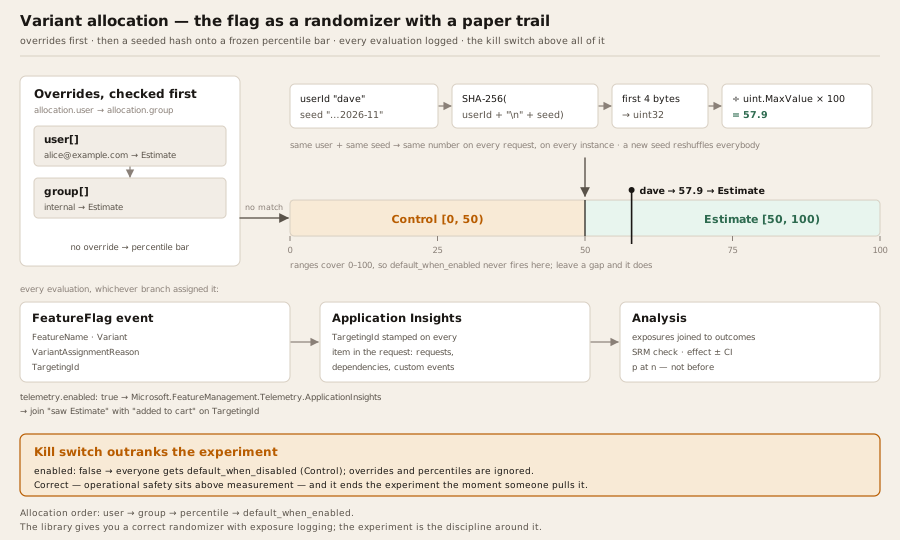
Here is what turns this flag into an experiment, and none of it is in the flag itself:
-
telemetry.enabled: truemakes every evaluation emit aFeatureFlagactivity event on theMicrosoft.FeatureManagementactivity source, tagged with the flag name, the variant, the assignment reason and the targeting id. Nothing receives those events until you wire a publisher: theMicrosoft.FeatureManagement.Telemetry.ApplicationInsightspackage forwards them to Application Insights and stamps every other telemetry item in the request with the sameTargetingId, which is what lets you later join “saw variant Estimate” with “added to cart”. The registration from section 02 grows by two lines, plus the middleware that carries the targeting id through the request:builder.Services.AddApplicationInsightsTelemetry(); // Application Insights first builder.Services .AddFeatureManagement() .WithTargeting<HttpTargetingContextAccessor>() .AddApplicationInsightsTelemetry(); // the feature-management publisher app.UseMiddleware<TargetingHttpContextMiddleware>();Azure App Configuration’s variant feature flags are the hosted version of the same schema. Note what that
TargetingIdis: whateverUserIdyour accessor supplied. If that is an e-mail address, it is now personal data sitting in your telemetry store, joined to every request. Where that is not acceptable, give the library an opaque subject id or a keyed hash of the identifier and keep the mapping elsewhere. - Only the randomized exposures count. Users placed by the
userandgroupoverrides — you, your testers, the internal group — were not randomized, and leaving them in the analysis biases it toward whatever variant you forced on them. The event carriesVariantAssignmentReasonprecisely so the analysis can keepPercentileand drop the rest. - A frozen allocation for the life of the test. The seed is deliberately dated so the next experiment on the same page gets a fresh shuffle.
- An analysis that runs somewhere else — a notebook, Log Analytics, an experimentation platform — and applies the sample size, the SRM check and the significance test from the previous section.
The library gives you a correct randomizer with exposure logging. The experiment is the discipline you wrap around it.
Rules for the combined case
Everything that goes wrong when a flag doubles as an experiment comes from applying flag habits to experiment flags. The rules are short.
Freeze the allocation; ramp the eligibility. If you need to start small for safety, do it one level up: put the whole experiment behind an ordinary rollout flag (eligibility 5% → 100%), and keep the 50/50 allocation inside it untouched. Editing percentiles mid-test moves users between arms and the hash guarantees nothing after that.
Match the unit to the metric. Randomize on whatever you count. Per-user metrics need per-user assignment, which means a stable user id — for anonymous traffic that is a first-party cookie or device id, and if your TargetingContext falls back to "anonymous" for logged-out users, every one of them lands in the same bucket and your 50/50 is fiction.
Log exposure where the user is actually exposed. Evaluating the flag in middleware for every request assigns and logs users who never see the product page; the effect you measure is then diluted by people who could not have been affected. Evaluate at the component that renders the difference.
Seeds are a tool, not a default. A shared seed gives a user the same percentile in every flag that uses it. That is the building block for mutual exclusion, not mutual exclusion itself: two experiments on one seed are exclusive only if their percentile ranges are disjoint — say the first tests inside 0–50 and the second inside 50–100, each with default_when_enabled pointing at a variant that is in neither test. Overlapping ranges on a shared seed do the opposite and put the same people in both treatments; user and group overrides bypass the percentiles entirely, as before. And when you wanted two independent tests, a shared seed has quietly correlated them.
The kill switch outranks the experiment. enabled: false sends everybody to default_when_disabled, overrides included. That is correct: operational safety sits above measurement. It also means the experiment is over the moment someone pulls it, and the data collected until then has an abrupt end that the analysis must account for.
Delete the flag when the decision is made. An experiment flag has a natural end date that a release flag never has — the day you decide. Ship the winner as plain code, remove both branches of the if, drop the configuration. A variant flag that survives its experiment is a release flag with extra states, which is the worst of both.
Check the plumbing before the lift. Before reading a single metric: did the split come out as configured (SRM), did both arms get traffic across the whole period, did the exposure counts match the request logs. Most “surprising” results die at this step, which is cheaper than shipping them.
What to build on
feature_flags table, a 30-second in-memory cache and the same SHA-256 bucketing shown above is a perfectly honest implementation. It stops being honest the day you need an audit trail, approvals, or an experiment — buy or adopt before then.Pick the question first
If the question is "can we ship this safely and back out in seconds?", you want a flag — targeted, percentage-based, ring by ring, with operational metrics on the dashboard and a deletion ticket already in the backlog. If the question is "should we ship this at all?", you want an experiment — a frozen split, a metric and a sample size chosen before the first user is assigned, exposure logged at the point of exposure, and an SRM check before anyone is allowed to celebrate.
The variant flag is where the two meet, and it is a good place to meet: the same hashing that makes a rollout sticky makes an assignment random, and the same telemetry that audits a flag feeds the analysis. Just remember which hat you are wearing when you open the config. A rollout you can edit whenever you like. An experiment you can only end.
References
- Pete Hodgson. Feature Toggles (aka Feature Flags) — categories of toggles, longevity and dynamism, toggle routers, and keeping the inventory low. martinfowler.com
- Microsoft Learn. .NET feature management reference — built-in filters, targeting audience schema, variants and allocation, telemetry and Application Insights integration. learn.microsoft.com
- Microsoft. FeatureManagement-Dotnet source — TargetingEvaluator (SHA-256 bucketing) and FeatureManager allocation order. github.com
- Microsoft Learn. Use variant feature flags in Azure App Configuration. learn.microsoft.com
- Unleash. Predefined strategy types — gradual rollout, stickiness and MurmurHash3 normalisation. docs.getunleash.io
- CNCF. OpenFeature project page — accepted June 2022, incubating since November 2023. cncf.io
- U.S. Securities and Exchange Commission. SEC Charges Knight Capital With Violations of Market Access Rule (press release 2013-222) — 45 minutes, 4 million orders, 397 million shares, more than $460 million lost, $12 million penalty. sec.gov
- U.S. Securities and Exchange Commission. In the Matter of Knight Capital Americas LLC, Release No. 34-70694 — the repurposed Power Peg flag and the eighth server. sec.gov
- Ron Kohavi, Stefan Thomke. The Surprising Power of Online Experiments. Harvard Business Review, September–October 2017. hbr.org
- Evan Miller. How Not To Run an A/B Test — repeated significance testing and the sample-size rule of thumb. evanmiller.org
- Aleksander Fabijan, Jayant Gupchup, Somit Gupta, Jeff Omhover, Wen Qin, Lukas Vermeer, Pavel Dmitriev. Diagnosing Sample Ratio Mismatch in Online Controlled Experiments: A Taxonomy and Rules of Thumb for Practitioners. KDD 2019. doi.org
- Wikipedia. Sample ratio mismatch — chi-squared detection and the 600/400 worked example. en.wikipedia.org
Categories