Deploy on Render (free demo)
A free, single-container LogStream for demos and tests, using file storage. It runs on Render’s Free web service type and is set up by the render.yaml Blueprint.
⚠️ Demo only. The Free instance spins down after 15 minutes without traffic (about a minute to wake), has 512 MB RAM / 0.1 CPU and no persistent disk: logs are lost on every redeploy, restart or spin-down. Use the Ubuntu or Docker guides for real use.
How it works
Render exposes one public port, but LogStream listens on two (HTTP API and WebSocket). Dockerfile.render adds Caddy in front, the same split the Nginx guides do:
Render edge (HTTPS :443)
        │
        ▼
Caddy :$PORT (10000)
   ├── Upgrade: websocket  ──▶  Ratchet   127.0.0.1:8080  (WS_PORT)
   └── everything else     ──▶  HTTP API  127.0.0.1:8081  (HTTP_PORT)
| File | Purpose |
|---|---|
Dockerfile.render | Production image + Caddy; defaults to file storage |
render/Caddyfile | Routes WebSocket upgrades to Ratchet, the rest to the API |
render/entrypoint.sh | Starts both processes; exits if either dies so Render restarts it |
render/retention.json | Demo retention: deletes entries older than 1 day, hourly |
render.yaml | Render Blueprint (Free plan, Frankfurt, health check, env vars) |
The PHP server is unchanged, so the regular Dockerfile and the existing deployments are not affected.
No UDP ingest on Render. Render (like most PaaS hosts) accepts only HTTP(S) from the internet, so the image and the blueprint set
UDP_ENABLED=false. Applications send logs withPOST /api/logs. For UDP ingestion, deploy on a VM or with Docker (Ubuntu, Docker).
Setup
1. Generate the secrets
composer install
php bin/generate-secret.php
# API_SECRET=lsa_…
# UI_SECRET=lsu_…
2. Create the Blueprint
- In the Render dashboard, switch to the workspace for the demo.
- New → Blueprint, connect GitHub if asked, and pick
guibranco/logstream-server(branchmain). - Render reads
render.yamland lists thelogstream-demoweb service. PasteAPI_SECRETandUI_SECRETwhen prompted. - Apply. The first Docker build takes a few minutes.
Prefer not to use a Blueprint? New → Web Service → the repository → Language Docker, Dockerfile path
./Dockerfile.render, Instance type Free, Health check path/api/health, and addAPI_SECRETandUI_SECRETunder Environment. Everything else has defaults in the image.
3. Check it
curl https://logstream-demo.onrender.com/api/health

curl -X POST https://logstream-demo.onrender.com/api/logs \
  -H "Authorization: Bearer $API_SECRET" \
  -H "Content-Type: application/json" \
  -d '{"app_key":"demo","app_id":"render","level":"info","category":"test","message":"Hello from Render"}'
The service name decides the URL; Render adds a suffix if logstream-demo is taken.
4. Point the UI at it
In logstream-ui Settings:
| Field | Value |
|---|---|
| API URL | https://logstream-demo.onrender.com |
| WebSocket URL | wss://logstream-demo.onrender.com/ws |
| Secret | your UI_SECRET |
Any path works for the WebSocket (/ws or /), as long as ?token= carries the UI_SECRET; the UI adds it.
Environment
| Variable | Default in image | Notes |
|---|---|---|
API_SECRET | — | Required. Write key |
UI_SECRET | — | Required. UI key: reads (UI + WebSocket) and retention / client management |
PORT | 10000 | Set by Render; Caddy listens here |
HTTP_PORT / WS_PORT | 8081 / 8080 | Internal only; must differ from PORT |
STORAGE_TYPE | file | mariadb also works with the DB_* variables |
LOG_PATH | /app/storage/logs | Ephemeral on the Free plan |
RETENTION_CONFIG | /app/render/retention.json | |
TRUSTED_PROXIES | loopback + private ranges | Records the real client in sender_ip |
APP_VERSION | first 7 chars of RENDER_GIT_COMMIT | |
SELF_LOG_ENABLED | true | Stores the server’s own messages as the app logstream-server; false turns it off |
DEMO_MODE | false (true in render.yaml) | Fills the demo with fake traffic on every start and serves the /demo page, see below |
DEMO_SEED_BACKFILL_HOURS | 6 | History written at start-up; keep it under the 1-day demo retention |
DEMO_SEED_INTERVAL | 5 | Seconds between live scenarios while the instance is awake |
Demo data
Storage is wiped on every spin-down, so with DEMO_MODE=true the entrypoint starts bin/demo-seed.php next to the server. It simulates ShopFast, a made-up shop of six backend services (storefront-api, auth-service, checkout-api, inventory-service, payment-worker, notification-worker): it backfills the last few hours, then sends a new scenario every few seconds while the instance is up. Each scenario (a sign-in, a search, a checkout through inventory, payment and e-mail, a background job) shares one trace_id across services and uses message templates, with the odd timeout, declined card or exhausted DB pool so every level shows up.
The seeder posts to the internal HTTP_PORT, never through Render’s proxy, so it does not keep the instance awake or use extra hours. The same script works against any LogStream server:
php bin/demo-seed.php --url=http://localhost:8081 --secret=lsa_local          # backfill + live
php bin/demo-seed.php --url=https://logstream-demo.onrender.com --secret=lsa_… --no-live
php bin/demo-seed.php --help
The /demo page
DEMO_MODE=true also serves a page at /demo (for the live demo, https://logstream-demo.onrender.com/demo) to trigger traffic by hand: run any scenario once or up to 50 times (a checkout, a declined card, a gateway timeout, an exhausted DB pool…), backfill up to 6 hours of history, or keep a random scenario going every few seconds while the page is open. It links to the UI with the server pre-filled.
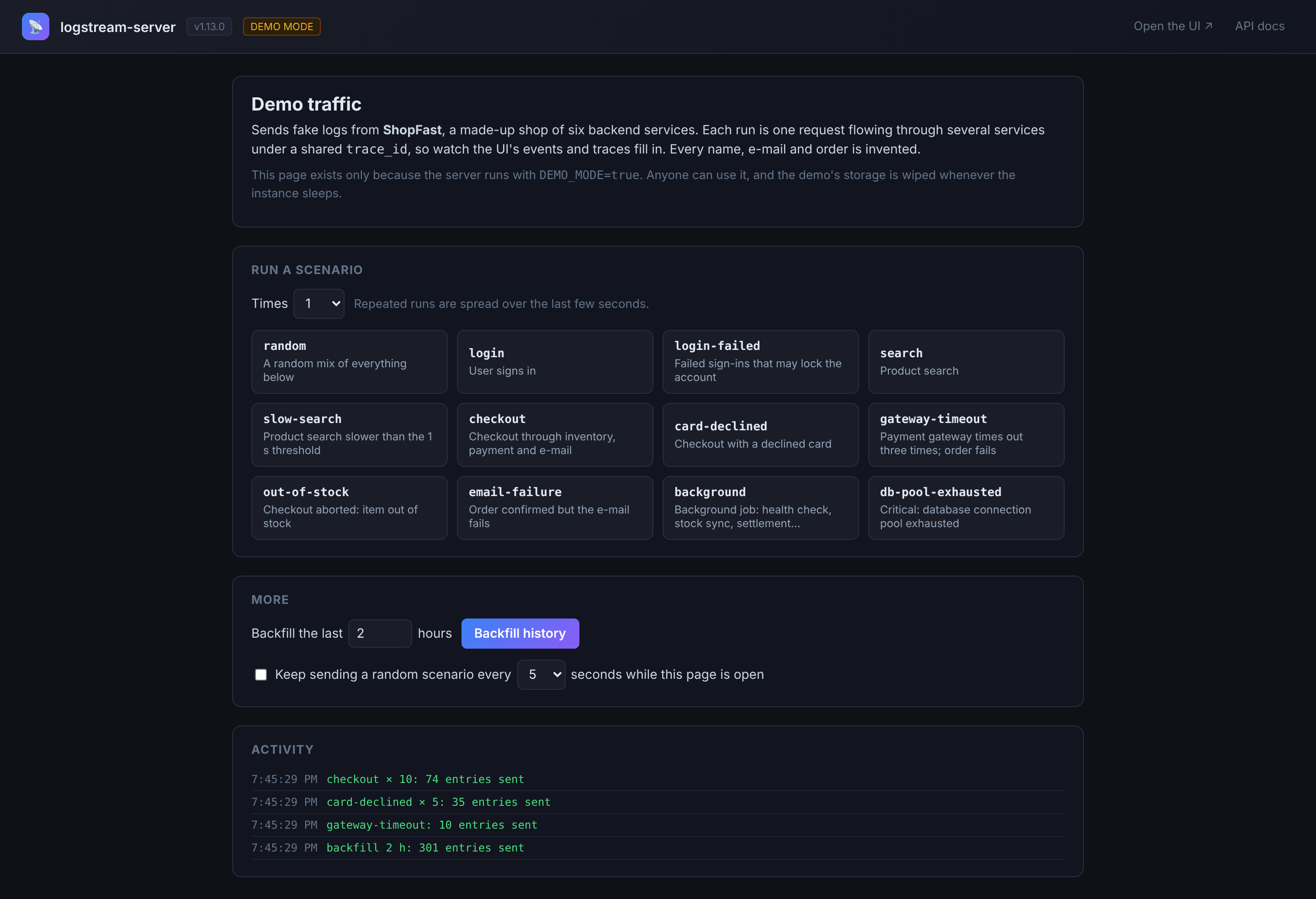
The page calls two endpoints that exist only in demo mode, and take no key because the demo’s keys are public anyway:
| Endpoint | Body | |
|---|---|---|
GET /api/demo/scenarios | — | Scenario names and descriptions, plus the limits |
POST /api/demo/run | {"scenario": "checkout", "count": 5} or {"backfill_hours": 2} | Same responses as POST /api/logs |
Without DEMO_MODE, /demo and /api/demo/* answer 404, and GET /api/info reports features.demo_mode: false. Don’t turn it on for a server with real data.
Free plan limits to keep in mind
- 750 Free instance hours per workspace per month, shared by every Free service in that workspace. Running out suspends all of them until the 1st, so a dedicated workspace for the demo keeps it apart from other services.
- Outbound bandwidth and build minutes are also counted per workspace.
- An open WebSocket counts as traffic, so a connected UI keeps the instance awake (and using hours).
- Don’t add keep-alive pings: they burn the hours.
Run the same image locally
docker build -f Dockerfile.render -t logstream-render .
docker run --rm -p 10000:10000 \
  -e API_SECRET=lsa_local -e UI_SECRET=lsu_local \
  logstream-render
# http://localhost:10000/api/health  ·  ws://localhost:10000/ws?token=lsu_local