GitHub Infisical secrets check Action





🚨 :octocat: A GitHub action to check and report secret leaks in the repository using Infisical CLI.
Usage
The following workflow step will scan for secret leaks in your repository.
- name: Infisical Secrets Check
  id: secrets-scan
  uses: guibranco/github-infisical-secrets-check-action@v5.2.0
Inputs
| Input | Description | Required | Default |
|---|---|---|---|
GH_TOKEN |
GitHub token to add comments in pull requests | No | $ |
ADD_COMMENT |
Whether to comment results in the pull request | No | true |
Outputs
| Output | Description |
|---|---|
secrets-leaked |
The number of secrets leaked found by the Infisical CLI tool |
Examples
Basic usage with default settings
name: Infisical secrets check

on:
  workflow_dispatch:
  pull_request:

jobs:
  secrets-check:
    runs-on: ubuntu-latest
    permissions:
      contents: read
      pull-requests: write
    steps:
      - name: Infisical Secrets Check
        uses: guibranco/github-infisical-secrets-check-action@v5.2.0
With a custom GitHub token
name: Infisical secrets check

on:
  workflow_dispatch:
  pull_request:

jobs:
  secrets-check:
    runs-on: ubuntu-latest
    permissions:
      contents: read
      pull-requests: write
    steps:
      - name: Infisical Secrets Check
        uses: guibranco/github-infisical-secrets-check-action@v5.2.0
        with:
          GH_TOKEN: $
Remember to add the repository secret CUSTOM_GH_TOKEN.
Disable PR comments
name: Infisical secrets check

on:
  workflow_dispatch:
  pull_request:

jobs:
  secrets-check:
    runs-on: ubuntu-latest
    permissions:
      contents: read
      pull-requests: write
    steps:
      - name: Infisical Secrets Check
        uses: guibranco/github-infisical-secrets-check-action@v5.2.0
        with:
          ADD_COMMENT: false
Using outputs in subsequent steps
name: Infisical secrets check

on:
  workflow_dispatch:
  pull_request:

jobs:
  secrets-check:
    runs-on: ubuntu-latest
    permissions:
      contents: read
      pull-requests: write
    steps:
      - name: Infisical Secrets Check
        id: secrets-scan
        uses: guibranco/github-infisical-secrets-check-action@v5.2.0

      - name: Handle secrets found
        if: steps.secrets-scan.outputs.secrets-leaked > 0
        run: |
          echo "Found $ leaked secrets!"
          # Add your custom handling logic here
Sample outputs
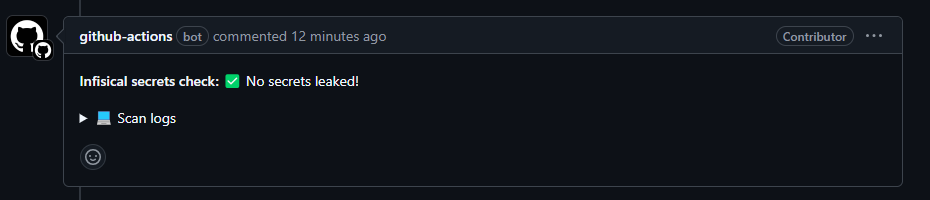
Success - ✅ No secrets leaked
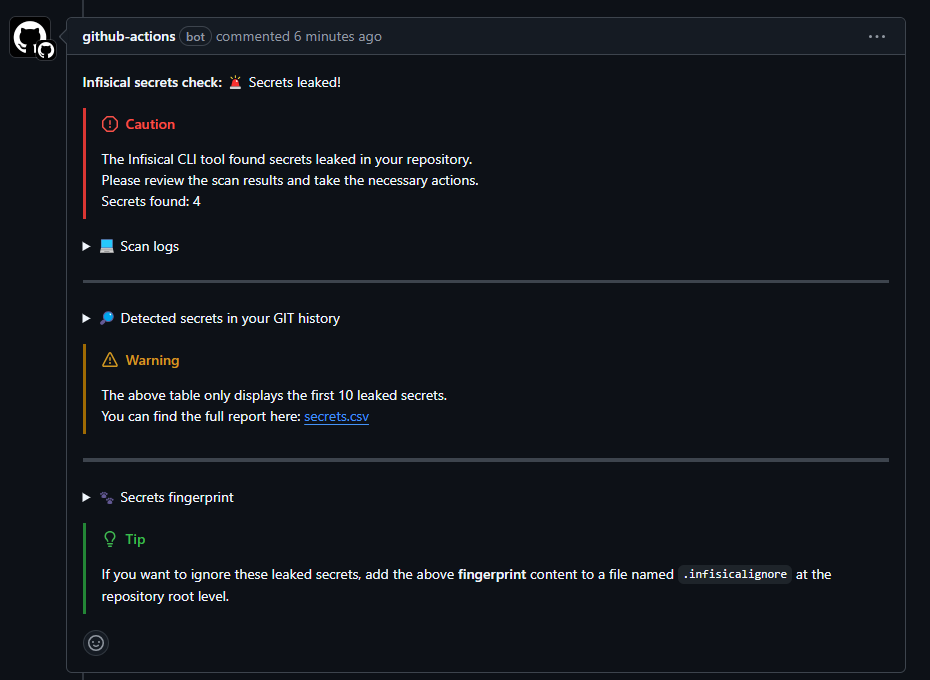
Failure - 🚨 Secrets leaked!
Version 5 introduces an improved remediation workflow:
When secrets are detected, the action now:
- Shows detected fingerprints
- Generates
.infisicalignoreupdate suggestions - Provides a Commit suggestion button directly inside the PR comment
- Automatically creates or updates
.infisicalignore - Prevents duplicate fingerprints
This allows contributors to fix false positives without leaving the pull request UI.
Tool Failure - ⚠️ Unable to complete scan
When the Infisical CLI fails to run (due to network issues, API rate limiting, etc.), the action will post a clear error message:
- Explains that this is a tool failure, not a security issue
- Provides suggestions for resolution (re-run workflow, check logs)
- Includes a link to workflow logs for debugging
- Clarifies that the failure doesn’t mean secrets were found
Features
- 🔍 Comprehensive scanning using the latest Infisical CLI
- 💬 Smart PR comments with structured scan results
- 🧠 Interactive remediation workflow (new in v5) with commit suggestion support
- 📝 Automatic
.infisicalignoregeneration/update suggestions - 🧹 Duplicate fingerprint prevention
- 📊 Detailed CSV and Markdown reports
- 🔒 Fork-safe execution
- ⚡ Efficient dependency caching
- 🛡️ Robust failure detection and reporting
- 📎 Workflow-friendly outputs
- 🔧 Configurable comment behavior
Error Handling
Version 4 introduced improved error handling that prevents confusing empty comments.
Version 5 builds on this by improving remediation guidance:
- Generates commit suggestions for ignore rules
- Prevents duplicate ignore entries
- Improces PR workflow ergonomics
- Keeps scan failures clearly separated from security failures
The action will fail the workflow appropriately, providing meaningful feedback on what went wrong and how to resolve it.
Permissions
The action requires the following permissions:
permissions:
  contents: read
  pull-requests: write
Ignoring False Positives
If the scan detects false positives:
Version 5 allows you to fix them directly from the PR comment.
The action now automatically:
- Detects whether
.infisicalignoreexists - Creates the file if missing
- Appends fingerprints if present
- Removes duplicates automatically
- Generates a Commit suggestion button
Simply click the suggestion button inside the PR comment to apply the ignore list instantly.
Manual fallback (still supported):
Create a .infisicalignore file at repository root:
fingerprint_value_here
another_fingerprint_here